SQL Server 2005 introduced four new ranking functions: ROW_NUMBER, RANK, DENSE_RANK, and NTILE. These functions allow you to analyze data and provide ranking values to result rows of a query. For example, you might use these ranking functions for assigning sequential integer row IDs to result rows or for presentation, paging, or scoring purposes.

All four ranking functions follow a similar syntax pattern:

function_name() OVER([PARTITION BY partition_by_list] ORDER BY order_by_list)

The basic syntax follows.

ROW_NUMBER() OVER ([<partition_by_clause>] <order_by_clause>)
RANK() OVER ([<partition_by_clause>] <order_by_clause>)
DENSE_RANK() OVER([<partition_by_clause>]<order_by_clause>)
NTILE(integer_expression) OVER ([<partition_by_clause>] <order_by_clause>)


Ranking functions are a subset of the built in functions in SQL Server. They are used to provide a rank of one kind or another to a set of rows in a partition. The partition can be the full result set, if there is no partition. Otherwise, the partitioning of the result set is defined using the partition clause of the OVER clause. The order of the ranking within the partition is defined by the order clause of OVER. Order is required even though partition is optional.

ROW_NUMBER: ROW-NUMBER function returns a sequential value for every row in the results. It will assign value 1 for the first row and increase the number of the subsequent rows.

Syntax:

SELECT ROW_NUMBER() OVER (ORDER BY column-name), columns FROM table-name

OVER – Specify the order of the rows

ORDER BY – Provide sort order for the records


RANK: The RANK function returns the rank based on the sort order. When two rows have the same order value, it provide same rank for the two rows and also the ranking gets incremented after the same order by clause.

Syntax:
SELECT
RANK() OVER ([< partition_by_clause >] < order_by_clause >)

SELECT RANK() OVER ([< partition_by_clause >] < order_by_clause >)

Partition_by_clause – Set of results grouped into partition in which RANK function applied.
Order_by_clause – Set of results order the within the partition


In the above example, based on the sort order Employee Name, the Rank is given.
The first two rows in the list has same Employee Name, those rows are given same Rank, followed by the rank of next for another set of rows because there are two rows that are ranked higher. Therefore, the RANK function does not always return consecutive integers.


DENSE_RANK: The DENSE_RANK function is very similar to RANK and return rank without any gaps. This function sequentially ranks for each unique order by clause.

Syntax:
SELECT DENSE_RANK() OVER ([< partition_by_clause >] <order_by_clause>)</order_by_clause>

SELECT DENSE_RANK() OVER ([< partition_by_clause >] )

Partition_by_clause – Set of reults grouped into partition in which DENSE RANK function applied.
Order_by_clause – Set of results Order the within the partition


NTILE: NTILE () splits the set of rows into the specified number of groups. It equally splits the rows for each group when the number of rows is divisible by number of group. The number is incremented for every additional group. If the number of rows in the table is not divisible by total groups count (integer_expression), then the top groups will have one row greater than the later groups. For example if the total number of rows is 6 and the number of groups is 4, the first two groups will have 2 rows and the two remaining groups will have 1 row each

Syntax:
SELECT NTILE (integer_expression) OVER ([< partition_by_clause >] <order_by_clause>) </order_by_clause>

SELECT NTILE (integer_expression) OVER ([< partition_by_clause >] )

(integer_expression) – The number of groups into which each partition must be divided.


  • The EXCEPT operator returns the rows that are only in the first result set but not in the second. EXCEPT introduced from SQL Server 2005.
  • The NOT IN
    returns all rows from returned from by first result set which does not exist in the second select statement
  • When we combine two queries using EXCEPT clause, it will returns distinct rows from the first SELECT statement that are not returned by the second one.
  • EXCEPT clause works the same way as the UNION operator of SQL and MINUS clause in Oracle.

    The syntax of EXCEPT clause is as follow

SELECT
column1
[, column2 ]
FROM
table1
[, table2 ]
[WHERE condition]

EXCEPT

SELECT
column1
[, column2 ]
FROM
table1
[, table2 ]
[WHERE condition]

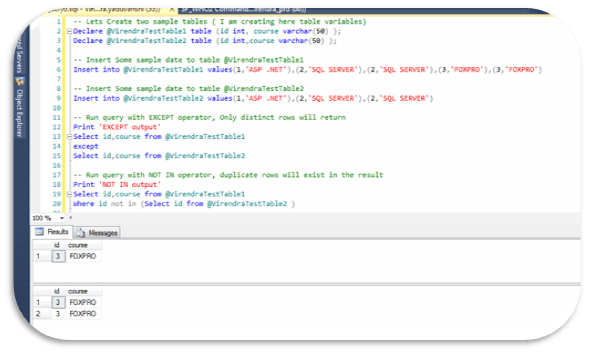
  • The difference between EXCEPT and NOT IN clause is EXCEPT operator returns all distinct rows from the rows returned by first select statement which does not exist in the rows returned by second select statement. On the other hand “NOT IN” will return all rows from returned by first select statement which does not exist in the rows returned by second select statement.

Below is example for same..

— Lets Create two sample tables ( I am creating here table variables)

Declare
@VirendraTestTable1
table (id
int,
course
varchar(50)
);

Declare
@VirendraTestTable2
table (id
int,course
varchar(50)
);


— Insert Some sample date to table @VirendraTestTable1

Insert
into
@VirendraTestTable1
values(1,‘ASP .NET’),(2,‘SQL SERVER’),(2,‘SQL SERVER’),(3,‘FOXPRO’),(3,‘FOXPRO’)


— Insert Some sample date to table @VirendraTestTable2

Insert
into
@VirendraTestTable2
values(1,‘ASP .NET’),(2,‘SQL SERVER’),(2,‘SQL SERVER’)


— Run query with EXCEPT operator, Only distinct rows will return

Print
‘EXCEPT output’

Select
id,course
from
@VirendraTestTable1

except

Select
id,course
from
@VirendraTestTable2


— Run query with NOT IN operator, duplicate rows will exist in the result

Print
‘NOT IN output’

Select
id,course
from
@VirendraTestTable1

Where
id
not
in
(Select
id
from
@VirendraTestTable2
)


Hence conclusion is ,

EXCEPT is defined in terms of duplicates based on distinctness, and for example (1 is distinct from 1) is false, (1 is distinct from NULL) is true and (NULL is distinct from NULL) if false.

NOT IN is defined in terms of equality, and for example, (1=1) is true,(1=NULL) is unknown and (NULL=NULL) is unknown.

Hi, It’s a headache for developers/DBA to write or read a complex SQL query using a number of Joins because Dealing with sub-queries often required to select a part of the data from a sub query or even join data from a query with some other many tables, for same we have an option to name our sub-queries with an alias or to use it directly and our business processes requirement may be getting more and more complex and as a resultant query would be not maintainable. Common Table Expressions(CTE) is a new way/method to define the sub-queries at once and name it using an alias and later call the same data using the alias just like what we do with a normal table. CTE is standard ANSI SQL standard.
Common table expression (CTE) can be thought of as a temporary result set that is defined within the execution scope of a single SELECT, INSERT, UPDATE, DELETE, or CREATE VIEW statement.
CTE allows us to generate Tables beforehand and use it later when we actually bind the data into the output while sub-queries is parallel process in this regard.

The basic syntax structure for a CTE is:

WITH expression_name [ ( column_name [,…n] ) ]
AS
( CTE_query_definition )

Let see an example –

Using Sub-Query

SELECT * FROM
(SELECT ED.EmpNameED.EmpDOBAD.EmpAddress From AddressDetails AD
Inner join EmployeeDetails ED on ED.EmpCode AD.EmpCodeAA
WHERE AA.Age > 50 ORDER BY AA.NAME

For Same, CTE implementation will as

With AA(NameAgeAddress–Provide Column names for CTE temporary Table ‘AA’
AS
SELECT ED.EmpNameED.EmpDOBAD.EmpAddress From AddressDetails AD
  Inner join EmployeeDetails ED on ED.EmpCode AD.EmpCde)
SELECT FROM AA WHERE AA.Age > 50 ORDER BY AA.NAME

CTE offers the advantages of improved readability and ease in maintenance of complex queries. The query can be divided into separate, simple, logical building blocks. These simple blocks can then be used to build more complex, interim CTEs until the final result set is generated.

Common Table Expressions offer the same functionality as a view, but are ideal for one-off usages where you don’t necessarily need a view defined for the system. CTE Create a recursive query. It’s a Substitute for a view when the general use of a view is not required; that is, you do not have to store the definition in metadata. Using CTE we can Reference the resulting table multiple times in the same statement.

As per MSDN, The following guidelines apply to nonrecursive common table expressions

  • A CTE must be followed by a single SELECT, INSERT, UPDATE, MERGE, or DELETE statement that references some or all the CTE columns. A CTE can also be specified in a CREATE VIEW statement as part of the defining SELECT statement of the view.
  • Multiple CTE query definitions can be defined in a nonrecursive CTE. The definitions must be combined by one of these set operators: UNION ALL, UNION, INTERSECT, or EXCEPT.
  • A CTE can reference itself and previously defined CTEs in the same WITH clause. Forward referencing is not allowed.
  • Specifying more than one WITH clause in a CTE is not allowed. For example, if a CTE_query_definition contains a subquery, that subquery cannot contain a nested WITH clause that defines another CTE.
  • The following clauses cannot be used in the CTE_query_definition:
    • COMPUTE or COMPUTE BY
    • ORDER BY (except when a TOP clause is specified)
    • INTO
    • OPTION clause with query hints
    • FOR XML
    • FOR BROWSE
  • When a CTE is used in a statement that is part of a batch, the statement before it must be followed by a semicolon.
  • A query referencing a CTE can be used to define a cursor.
  • Tables on remote servers can be referenced in the CTE.
  • When executing a CTE, any hints that reference a CTE may conflict with other hints that are discovered when the CTE accesses its underlying tables, in the same manner as hints that reference views in queries. When this occurs, the query returns an error.
  • When a CTE is the target of an UPDATE statement, all references to the CTE in the statement must match. For example, if the CTE is assigned an alias in the FROM clause, the alias must be used for all other references to the CTE. Ambiguous CTE references may produce unexpected join behavior and unintended query results

Guidelines for Defining and Using Recursive Common Table Expressions

The following guidelines apply to defining a recursive common table expression:

  • The recursive CTE definition must contain at least two CTE query definitions, an anchor member and a recursive member. Multiple anchor members and recursive members can be defined; however, all anchor member query definitions must be put before the first recursive member definition. All CTE query definitionsare anchor members unless they reference the CTE itself.
  • Anchor members must be combined by one of these set operators: UNION ALL, UNION, INTERSECT, or EXCEPT. UNION ALL is the only set operator allowed between the last anchor member and first recursive member, and when combining multiple recursive members.
  • The number of columns in the anchor and recursive members must be the same.
  • The data type of a column in the recursive member must be the same as the data type of the corresponding column in the anchor member.
  • The FROM clause of a recursive member must refer only one time to the CTE expression_name.
  • The following items are not allowed in the CTE_query_definition of a recursive member:
    • SELECT DISTINCT
    • GROUP BY
    • HAVING
    • Scalar aggregation
    • TOP
    • LEFT, RIGHT, OUTER JOIN (INNER JOIN is allowed)
    • Subqueries
    • A hint applied to a recursive reference to a CTE inside a CTE_query_definition.

    The following guidelines apply to using a recursive common table expression:

  • All columns returned by the recursive CTE are nullable regardless of the nullability of the columns returned by the participating SELECT statements.
  • An incorrectly composed recursive CTE may cause an infinite loop. For example, if the recursive member query definition returns the same values for both the parent and child columns, an infinite loop is created. To prevent an infinite loop, you can limit the number of recursion levels allowed for a particular statement by using the MAXRECURSION hint and a value between 0 and 32,767 in the OPTION clause of the INSERT, UPDATE, MERGE, DELETE, or SELECT statement. This lets you control the execution of the statement until you resolve the code problem that is creating the loop. The server-wide default is 100. When 0 is specified, no limit is applied. Only one MAXRECURSION value can be specified per statement.
  • A view that contains a recursive common table expression cannot be used to update data.
  • Cursors may be defined on queries using CTEs. The CTE is the select_statement argument that defines the result set of the cursor. Only fast forward-only and static (snapshot) cursors are allowed for recursive CTEs. If another cursor type is specified in a recursive CTE, the cursor type is converted to static.
  • Tables on remote servers may be referenced in the CTE. If the remote server is referenced in the recursive member of the CTE, a spool is created for each remote table so the tables can be repeatedly accessed locally. If it is a CTE query, Index Spool/Lazy Spools is displayed in the query plan and will have the additional WITH STACK predicate. This is one way to confirm proper recursion.
  • Analytic and aggregate functions in the recursive part of the CTE are applied to the set for the current recursion level and not to the set for the CTE. Functions like ROW_NUMBER operate only on the subset of data passed to them by the current recursion level and not the entire set of data passed to the recursive part of the CTE.

SQL injection is a technique often used to attack a website.It is an attack in which attacker take the advantage of insecure application over internet by running the SQL command against the database and to steal information from it that too using GUI of the website. This attack can happen with the applications in which SQL queries are generated in the code. The attacker tries to inject their own SQL into the statement that the application will use to query the database.
Examples-
1) For example suppose the below query string is used for a search feature in a website and a user may have the inserted “VIRENDRA” as the keyword to search. If in the code behind the keyword is directly used into the SQL statement, it will be like.
String sql = “Select EmpName, City from EmployeeMaster where EmpName like ‘%” + txtSearch.Text + “%'”;
But the attacker might enter the keyword like
‘ UNION SELECT name, type, id from sysobjects;–
This way attacker can get details of all the objects of the application database and using that attacker can steal further information.

2) Web applications use string queries, where the string contains both the query itself and its parameters. The string is built using server-side script languages such as ASP, JSP and CGI, and is then sent to the database server as a single SQL statement. The following example demonstrates an ASP code that generates a SQL query.

sql_query= SELECT ProductName, ProductDescription FROM Products WHERE ProductNumber = ” & Request.QueryString(“ProductID”)
The call Request.QueryString(“ProductID”) extracts the value of the Web form variable ProductID so that it can be appended as the SELECT condition.
When a user enters the following URL:
http://www.mydomain.com/products/products.asp?productid=123

The corresponding SQL query is executed:

SELECT ProductName, ProductDescription FROM Products WHERE ProductNumber = 123

An attacker may abuse the fact that the ProductID parameter is passed to the database without sufficient validation. The attacker can manipulate the parameter’s value to build malicious SQL statements. For example, setting the value “123 OR 1=1” to the ProductID variable results in the following URL:

http://www.mydomain.com/products/products.asp?productid=123 or 1=1

The corresponding SQL Statement is:

SELECT ProductName, Product Description FROM Products WHERE ProductNumber = 123 OR 1=1

This condition would always be true and all ProductName and ProductDescription pairs are returned. The attacker can manipulate the application even further by inserting malicious commands. For example, an attacker can request the following URL:

http://www.mydomain.com/products/products.asp?productid=123; DROP TABLE Products

In this example the semicolon is used to pass the database server multiple statements in a single execution. The second statement is “DROP TABLE Products” which causes SQL Server to delete the entire Products table.

An attacker may use SQL injection to retrieve data from other tables as well. This can be done using the SQL UNION SELECT statement. The UNION SELECT statement allows the chaining of two separate SQL SELECT queries that have nothing in common. For example, consider the following SQL query:

SELECT ProductName, ProductDescription FROM Products WHERE ProductID = ‘123’ UNION SELECT Username, Password FROM Users;

The result of this query is a table with two columns, containing the results of the first and second queries, respectively. An attacker may use this type of SQL injection by requesting the following URL:

http://www.mydomain.com/products/products.asp?productid=123 UNION SELECT user-name, password FROM USERS

The security model used by many Web applications assumes that an SQL query is a trusted command. This enables attackers to exploit SQL queries to circumvent access controls, authentication and authorization checks. In some instances, SQL queries may allow access to host operating system level commands. This can be done using stored procedures. Stored procedures are SQL procedures usually bundled with the database server. For example, the extended stored procedure xp_cmdshell executes operating system commands in the context of a Microsoft SQL Server. Using the same example, the attacker can set the value of ProductID to be “123;EXEC master..xp_cmdshell dir–“, which returns the list of files in the current directory of the SQL Server process or as well as pass any DOS command using cmdshell.


Hi, As DBA, its many time we have to faced Questions from Auditors or Clients where your SQL Server follow SQL Server Hardening best practices?, Here are some few as,

  • During installation, Install only required components, When the SQL Server installation is complete, harden the SQL Server environment.
  • After the installation, use the SQL Server Configuration Manager tool in order to disable unnecessary features and services.
  • Install the most recent critical fixes and service packs for both Windows and SQL Server.
  • When you’re selecting authentication modes, Windows Authentication is a more secure choice
  • If there is still a need to use SQL Authentication – enforce strong password policy.
  • Do not use the SA account for day-to-day administration, logging on to the server remotely, or having applications use it to connect to SQL. It is best if the SA account is disabled and renamed.
  • Create a role-based security policy with the Security Configuration Wizard tool.
  • Create policies with Policy Based Management enable/ disable unnecessary features and services.
  • After the server has been hardened, periodically asses the server’s security using the MBSA (Microsoft Baseline Security Analyzer) and SQL Server BPA (Best Practices Analyzer).
  • For production SQL Servers running mission-critical databases, either hide the instance or disable the SQL Server Browser service.
  • Change the default ports associated with the SQL Server installation to put off hackers from port-scanning the server.
  • Enable a firewall to filter unnecessary and unknown traffic.
  • At the very least, set security auditing to failed login attempts; otherwise, both failed and successful logins should be captured and monitored.
  • If upgrading previous versions of SQL Server, remove the BUILTIN/Administrators group from the SQL Server Logins.
  • Use the IIS Lockdown and URL Scan tools to harden IIS.

Dear Friends, As you know, It’s the great option to delete millions or billions of records using batches transactions, in this the logs does not grow drastically and makes recovery faster in the event of failures.
Its my observation, some time if we use CHECKPOINT in each transaction, give very fruitful performance in production environment, because Database Engine performs modifications to database pages in memory—in the buffer cache—and does not write these pages to disk after every change. Rather, the Database Engine periodically issues a checkpoint on database. A checkpoint writes the current in-memory modified pages (known as dirty pages) and transaction log information from memory to disk and, also, records information about the transaction log.

Let see an example,
Please Note : Here one point have to keep in mind , if we are using any date comparisons to delete records, have to store that value in a variable, will be much faster than using in query’s WHERE directly. Suppose we have to delete 60 days old records, then setting the date initially would make a difference instead of calculating for each row.

DECLARE @DelDate DATETIME;
SET 
@DelDate DATEADD(d60,GETDATE())
WHILE 1 = 1
    BEGIN
        — Choose records count as per your records size.
        DELETE 
TOP (1000FROM MyTableName WHERE column_name<@DelDate
        IF @@ROWCOUNT< 1000 BREAK;
        CHECKPOINT;
    END

One more approach , it may be this operation can generate a lot of disk I/O, So its recommend that you put a “WAITFOR DELAY ‘time_to_pass'” statement in the loop to reduce the stress on your server. Waiting for even a quarter of a second between DELETE executions can reduce stress on your production environment, but its better in case of Production Server if records amount are large not so huge.

DECLARE @DelDate DATETIME;
SET 
@DelDate DATEADD(d,-60,GETDATE());

WHILE 1 = 1
    BEGIN
     — Choose records count as per your records size.
        DELETE 
TOP (1000FROM MyTableName WHERE column_name @DelDate
        IF @@ROWCOUNT < 1000 BREAK;
        CHECKPOINT;
        WAITFOR 
DELAY ’00:00:00.250′ — wait for quarter second
    END

Hope you like this way to get better performance .

As a SQL Server Administrator, We have to always follow some server specific settings, below are few among them.

  • The login auditing is configured to “Failed logins only” by default. This is to record and audit the login failure attempts and is a recommended security best practice. Consider enabling Auditing for failed logins.
  • Use 2048 bit and above to create asymmetric keys.
  • There are SQL Server Agent job steps that use the incorrect brackets to call out tokens. Starting with SQL Server 2005, the token syntax changed, and square brackets – [ ], are no longer used to call out SQL Server Agent job step tokens.
  • Windows Authentication is the default authentication mode, and is much more secure than SQL Server Authentication. Windows Authentication uses Kerberos security protocol, provides password policy enforcement with regard to complexity validation for strong passwords, provides support for account lockout, and supports password expiration.
  • The SQL Server error log contains messages that indicate either the failure of database file autogrow operations or that these operations took a long period of time to complete. An application will have timeouts, or query performance will be decreased, if database file growth happens during regular activity. Enable Instant File Initialization, pre-autogrow the database files to the required size, and use a growth value in absolute size.
  • Review the backup schedules of all critical databases and schedule backups based on the various tolerance levels.
  • If The combination of the affinity mask and affinity I/O mask is incorrect then Configure the affinity mask and affinity I/O mask, such the CPU masks, do not overlap.
  • If the instance of SQL Server has recorded one or more potentially dangerous data inconsistency and data corruption errors in the past then For each one of the affected databases that encountered these errors, perform database consistency checks and take appropriate decision accordingly.
  • Sometimes one or more databases on server that have their data and log files in the same volumes can cause contention for that device and result in poor performance, for this its recomended that the Data and log files should be placed on separate volumes.
  • Inconsistencies that exist in a database can threaten the availability of the entire database or some portions of it for the application. It should be Schedule a DBCC CHECK to perform a consistency check of the problematic database.
  • Never place database files and backup files on the same volume, Always perform backups to a different volume or to a remote location/SAN.
  • Always avoid the Shrink option to manage the database file sizes. Frequent grow and shrink operations can lead to excessive fragmentation and performance issues.
  • If the databases have not CHECKSUM page protection, must need to enable this protection on those databases becausetThe CHECKSUM protection provides a high level of data integrity guarantee when reading database pages from disk.
  • Always try to avoid Auto Close database option disable because for a On systems, repeated opening and closing of the database can result in performance problems and timeout issues.
  • Be informative about Recovery Model, its always recommended that the FULL or BULK-LOGGED recovery model must be used in production servers.
  • There are databases that contain a transaction log file that contains a high number of virtual log files (VLFs).A high number of virtual log files can effect database recovery performance, and consequently, also effect various database maintenance operations that depend on recovery.in this case always Reconfigure the transaction log files for these database. For this please visit http://support.microsoft.com/kb/2028436
  • if default extended event health session is either not active or changed, Reset the changes done to the default extended event health session. The default extended event health session records critical events that can be useful for root cause investigations of certain server conditions.
  • If The max degree of parallelism option is not set to the recommended value, needs to use sp_configure stored procedure to set the max degree of parallelism option to 8 or less.Setting this option to a large value often results in unwanted resource consumption and performance degradation.
  • Incorrect partition alignment can result in adverse I/O performance impacts on SQL Server queries and operations.The hard-disk partitions are configured optimally if partitions have a starting offset of 65536 bytes, or a multiple of 65536 bytes.
  • Using cross-database or distributed transactions on a mirrored database could lead to inconsistencies after a failover.
  • Enabling the guest account allows anonymous connections to your database, The Guest account has access to databases, excluding the master, tempdb, and msdb databases.The guest user cannot be dropped. However, run REVOKE CONNECT FROM GUEST within any database other than the master or tempdb database to revoke the guest user’s CONNECT permission and disable the guest user.
  • If you see presence of Event ID 12, it indicates memory corruption due to a firmware or BIOS issue,This problem can result in system instability and data corruption, for same Check with hardware manufacturer for updated firmware and BIOS.
  • SQL Server reports Event ID 833 when I/O requests take longer than 15 seconds to finish.This indicates a potential problem with the disk I/O subsystem or configuration. This affects SQL Server performance.Use system monitor disk counters to measure disk throughput and response rates. Perform appropriate configuration changes to ensure disk response times are acceptable.
  • Event ID 825 indicates that SQL Server was unable to read data from the disk on the first try.Even though retry was successful, this is usually an indication of an underlying issue that needs investigation and fixing before it becomes worse.
  • If startup parameters for the SQL Server service are incorrect, can result in unexpected SQL Engine behavior and can also cause startup problems.Use the SQL Server Error Log to review the startup parameters that the instance of SQL Server is currently using. Then, use the SQL Configuration Manager to correct these parameters.
  • Its need to set to disable the lightweight pooling option using sp_configure stored procedure,fiber mode scheduling for routine operations can decrease performance by inhibiting the regular benefits of context switching. Furthermore, some components of SQL Server cannot function correctly in fiber mode.
  • If lock is set to a nonzero value, large transactions can encounter the “out of locks” error message, if the value specified is exceeded.Use the sp_configure system stored procedure to change the value of locks to its default setting.
  • The Microsoft Distributed Transaction Coordinator (MSDTC) needs configured properly.
  • The value for the network packet size needs not too high. Excessive memory allocations are needed to support these large network packet size, and can cause memory loss and other stability issues on the server. Be sure, Configuration of the network packet size option to be set as default value.
  • Granting users, who are not Administrators, more than read permission on the Binn folder represents a potential security risk, Only administrators should have full control permission on the Binn folder.
  • Check the permission on the Data folder. Only server administrators and SQL Server service groups should have full control permission on the Data folder. Other users and groups should not have any access.
  • The public database role has EXECUTE permissions on some of the Data Transformation Services (DTS) system stored procedures in the msdb database.A potential security issue occurs if an application uses a login that owns DTS packages to connect to an instance of SQL Server. In this scenario, there is the risk that a SQL injection attack could modify or delete existing DTS packages.Use the sp_dts_secure stored procedure to revoke public access to DTS stored procedures.
  • Every login that is created on the server is a member of the public server role. If this condition is met, every login on the server will have server permissions.Do not grant server permissions to the public server role.
  • Frequently review the Event Log entries that indicate the crash and apply the solutions provided.
  • Enable “Enforce password policy” and “Enforce password expiration” for all the SQL Server logins. Use ALTER LOGIN (Transact-SQL) to configure the password policy for the SQL Server login.Password complexity policies are designed to deter brute force attacks by increasing the number of possible passwords.Disabling the password policy could allow the user to create a SQL Server login with a weak password.
  • The sysadmin role may not be applied correctly. The sysadmin role membership should be granted to limited users. Check the membership and determine if users other than Local System, SQL Server built in admin (SA), SQL Server Engine and Agent service account or service SID are granted sysadmin permission.Grant sysadmin role membership to users who require it. Carefully evaluate the membership of the sysadmin role. Granting sysadmin membership to users who do not require it represents potential security risk.
  • If the Public Role in MSDB is enabled for the SQL Server Agent proxy account, Remove the Public Role in MSDB from the SQL Server Agent proxy account. Typically, the proxy account is given elevated privileges, so someone using the Public Role in MSDB, which has fewer privileges, could take advantage of a higher privilege level.
  • The error log files for SQL Server are very big. This could be due to repetitive errors or information messages.If the error logs are growing due to frequent error conditions, then it will cause stability and availability problems.Best Practices Recommendations Examine the error log to find out why it is growing. If it is expected information, cycle the error logs frequently and configure more error logs to be retained.
  • Do not install SQL Server on a computer that is a domain controller. Installing a SQL Server failover cluster instance on a domain controller is not supported.
  • The SQL Server uses the default values for SQL Server memory configuration [-g parameter] and is also configured to use CLR integration. It may encounter various out-of-memory conditions and associated performance problems, to configure enough memory to handle CLR integration and other needs, use the -g startup parameter.
  • To reduce contention in the tempdb database, increase the number of tempdb data files, and configure the required startup trace flags. Under a heavy load, the tempdb database can become a single point of contention and affect concurrency and performance.
  • Use AES 128-bit and greater to create symmetric keys for data encryption. If AES is not supported by the version of your operating system, use 3DES. Do not create symmetric keys in the databases shipped with SQL Server, such as the master, msdb, model, and tempdb databases.
  • Running the SQL Server Agent service/FDHOST Launcher service under a highly-privileged account represents a potential security risk.Use a specific low-privilege user account or domain account to run the SQL Server Agent service/FDHOST Launcher service.
  • Avoid using unsupported .NET Framework assemblies. If you must use them, always update them in the database when you update them in the GAC.
  • If databases whose collation is different from the model, and therefore, their collations are different from the collation used by the tempdb database, there might be collation conflict errors and unexpected behavior when using different collations to compare data in a user database against the tempdb database. to resolve this, Rebuild the user database to match the model database collation or specify COLLATE when creating temp tables.

Backup is an important key component of a disaster recovery strategy. Using a valid and restorable backup is the last thing when the moment comes to execute a real disaster recovery scenario during an emergency downtime.

Here are some points to be follow as

Make sure you are not storing your backups in the same physical location as the database files. When your physical drive goes bad, you should be able to use the other drive or remote location that stored the backups in order to perform a restore. Keep in mind that you could create several logical volumes or partitions from a same physical disk drive. Carefully study the disk partition and logical volume layouts before choosing a storage location for the backups.
Its necessary to restore the backups on a test server and verify that you can restore with all the options and conditions you need to use during a planned or un-planned downtime. Use the verification options provided by the backup utilities of BACKUP TSQL command, SQL Server Maintenance Plans or other your backup software or solution if you are using.
Its always also recommended to use advanced features like BACKUP CHECKSUM to detect problems with the backup media itself, like as below

BACKUP DATABASE [VirendraTest] TO DISK N’D:\Database\VirendraTest.Bak’ WITH CHECKSUM;
GO

As we know there are 5 System Databases as MASTER,MSDB,MODEL,TEMPDB ( All these are Primary System Database ) & hidden read only RESOURCE.
Primary System Databases

Master – It Contains information about logins and information about all other databases

MSDB – It Contains Jobs, Operators, Alerts, Backup and Restore History, Database Mail information …….. etc..

MODEL – It Contains a model for all new databases. If you want certain objects to be in all new databases this is where you configure this information.

TEMPDB – Its created each time SQL Server starts and no needs for Backup.

Resource
Database
The Resource database is a read-only hidden database that contains all the system objects which are included within SQL Server. The DBA needs to perform a file-based copy of mssqlsystemresource.mdf and mssqlsystemresource.ldf files of the Resource database as SQL Server doesn’t support backing up the Resource database. In SQL Server 2005 the Resource database is available in “<drive>:\Program Files\Microsoft SQL Server\MSSQL.1\MSSQL\Data\” location and in SQL Server 2008 the Resource database is available in “<drive>:\Program Files\Microsoft SQL Server\MSSQL10.<instance_name>\MSSQL\Binn\” location


/* Copy Resource Database Files Using XP_CMDSHELL */

EXEC xp_cmdshell ‘COPY /Y “D:\Program Files\Microsoft SQL Server\MSSQL10.SQL2008\MSSQL\Binn\mssqlsystemresource.mdf” “E:\SYSDBBKUP”‘
GO

EXEC xp_cmdshell ‘COPY /Y “D:\Program Files\Microsoft SQL Server\MSSQL10.SQL2008\MSSQL\Binn\mssqlsystemresource.ldf” “E:\SystemDatabaseBackups”‘
GO

Hi Guys, Here, some basic tips about How to write optimized Stored Procedure.

  • Its always better to use table owner in query like

    SELECT col1,col2….coln FROM dbo.Tablename

  • Due to this, SQL query optimizer does not have to decide whether to retrieve from dbo.Tablename or other owner’s table and avoids recompilation.
  • Always Use TRUNCATE TABLE statement instead of DELETE clause if its needed to delete all rows from a table. Its more faster then DELETE statement without any conditions. TRUNCATE TABLE always releases all the space occupied by that table’s data and indexes, without logging the individual row deletes.
  • Don’t use the “sp_” prefix in a stored procedure name as the “sp_” prefix is reserved for system stored procedures. Any stored procedure that has the “sp_” prefix will cause an extra lookup in the MASTER database If a stored procedure uses same name in both the user database and a system database, the stored procedure in the user database will execute but first it will find the procedure in resource database and then the user database (for SQL server 2005/2008/2012) hence causing an extra burden to the server.
  • To get number of rows from table never use “SELECT COUNT(*)” statement, There is other way for much faster to achieve this goal as

    SELECT rows FROM sysindexes WHERE id OBJECT_ID(‘Table_Name’) AND indid <2

  • Include “SET NOCOUNT ON” statement in your stored procedures to greatly reduce network traffic.
  • Try to use table variables instead of Temporary Tables – Temp tables can cause stored procedures to recompile. (From SQL 2005 onwards, using temporary table not always causing recompilations. But adding rows to temporary tables may cause recompilations). But table variables were designed specifically to guard against stored procedure recompiles during execution. If the result set is not containing a huge number of records then you should stick to table variable, otherwise temp table has its advantages. There is a misconception that temp tables always use the tembdb database but table variable do not. Table variables also use tempdb after a certain size be careful to use them only with not very huge amount of data that you want to allocate in temp tables, otherwise you can easily get the server down.

Here, The best practices used for Stored Procedure .

Stored Procedure Tunning 

You can also visit here http://youtu.be/A-17sMgQqnM