Archive for the ‘Database Administrator’ Category

As we know blocking occurs when one SPID holds a lock on a specific resource and a second SPID attempts to acquire a conflicting lock type on the same resource. Typically, the time frame for which the first SPID locks the resource is very small. When it releases the lock, the second connection is free to acquire its own lock on the resource and continue processing. This is normal behavior and may happen many times throughout the course of a day with no noticeable effect on system performance.
By using the read-committed snapshot isolation level introduced in Microsoft SQL Server 2005, we can reduce blocking and deadlocking issues caused by lock contention.Every time a row is modified by a specific transaction, the instance of the Database Engine stores a version of the previously committed image of the row in tempdb. 

As per BOL, The read-committed snapshot isolation level provides the following benefits:

  • SELECT statements do not lock data during a read operation. Read transactions do not block write transactions and vice versa.
  • Since SELECT statements do not acquire locks in most cases, the number of locks required by a transaction is reduced, which reduces the system overhead required to manage locks.
  • The possibility of blocking is significantly reduced.
  • SELECT statements can access the last committed value of the row while other transactions are updating the row without getting blocked.
  • The number of blocks and deadlocks is reduced.
  • Fewer lock escalations occur.

A quick and easy way to remember how Read-Committed Snapshot Isolation works:

  • Readers DO NOT block Writers
  • Writers DO NOT block Readers
  • Writers DO block Writers

REMEMBER: TempDB is a critical resource for the performance of Read-Committed Snapshot Isolation. RCSI puts a copy of the records that are being modified in TempDB before the transaction is committed so you need to make sure that TempDB has appropriate space and is placed on fast drives that ideally are isolated away from your user database data and log files.

The default Syntax is as

SET TRANSACTION ISOLATION LEVEL
{ READ COMMITTED | READ UNCOMMITTED | REPEATABLE READ | SERIALIZABLE }

As we know, to check whats going on at server level, we commonly use SP_WHO or SP_WHO2 but from both of these, there are no clear picture about exact commands which currently running on server, these shows the command, not exact full text string that’s currently running, Here is a some DMV’s manipulation to find the same.

SELECT SPID er.session_id
,BlkBy 
er.blocking_session_id
,ElapsedMS
er.total_elapsed_time
,CPU 
er.cpu_time
,IOReads 
er.logical_reads er.reads
,IOWrites 
er.writes
,Executions 
ec.execution_count
,CommandType 
er.command
,ObjectName 
OBJECT_SCHEMA_NAME(qt.objectid,dbid‘.’ + OBJECT_NAME(qt.objectidqt.dbid)
,SQLStatement 
= SUBSTRING(qt.text,er.statement_start_offset/2,
(
CASE WHEN er.statement_end_offset 1 THEN LEN(CONVERT(nvarchar(MAX), qt.text)) * 2 ELSE
                er.statement_end_offset 
END – er.statement_start_offset)/2)
,Status 
ses.status
,[Login] 
ses.login_name
,Host 
ses.host_name
,DBName 
DB_Name(er.database_id)
,LastWaitType 
er.last_wait_type
,StartTime 
er.start_time
,Protocol 
con.net_transport
,transaction_isolation 
=CASE ses.transaction_isolation_level 
                        WHEN 0 THEN ‘Unspecified’
                        WHEN 1 THEN 
‘Read Uncommitted’
                        WHEN 2 THEN ‘Read Committed’
                        WHEN 3 THEN ‘Repeatable’
                        WHEN 4 THEN ‘Serializable’
                        WHEN 5 THEN ‘Snapshot’
                        END
,ConnectionWrites 
con.num_writes
,ConnectionReads 
con.num_reads
,ClientAddress 
con.client_net_address
,Authentication 
con.auth_scheme
FROM 
sys.dm_exec_requests er
LEFT JOIN sys.dm_exec_sessions ses ON ses.session_id er.session_id
LEFT 
JOIN sys.dm_exec_connections con ON con.session_id ses.session_id
CROSS 
APPLY sys.dm_exec_sql_text(er.sql_handleas qt
OUTER APPLY SELECT execution_count MAX(cp.usecountsFROM sys.dm_exec_cached_plans cp
WHERE cp.plan_handle er.plan_handle ec
ORDER BY er.blocking_session_id DESCer.logical_reads er.reads DESCer.session_id

Similarity

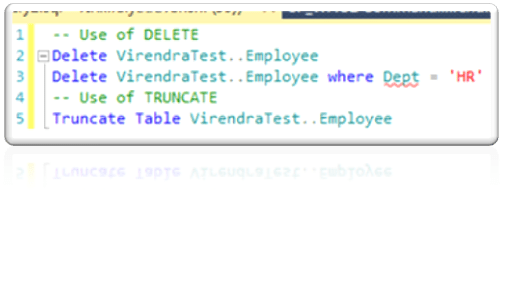
These both command will only delete data of the specified table, they cannot remove the whole table data structure.

Difference

  • TRUNCATE is a DDL (data definition language) command whereas DELETE is a DML (data manipulation language) command.
  • We can’t execute a trigger in case of TRUNCATE whereas with DELETE command, we can execute a trigger.
  • TRUNCATE is faster than DELETE, because when you use DELETE to delete the data, at that time it store the whole data in rollback space from where you can get the data back after deletion. In case of TRUNCATE, it will not store data in rollback space and will directly delete it. You can’t get the deleted data back when you use TRUNCATE.
  • We can use any condition in WHERE clause using DELETE but you can’t do it with TRUNCATE.
  • If table is referenced by any foreign key constraints then TRUNCATE will not work.

sp_executesql is use for parameterized statements while EXEC does not support Parameterized statements. Parameterized statements is more secured in terms of SQL injection and its better reuse in the plan cache which reduces overhead on the server and boost up performance. Sp_executesql executes a string of Transact-SQL in its own self-contained batch. When it is run, SQL Server compiles the code in the string into an execution plan that is separate from the batch that contained the sp_executesql and its string.

Suppose, if a query which takes a parameter i.e. “EmpID”, When we run the query with ” EmpID ” as 1 and 2 it would be creating two different cache entry (one each for value 1 and 2 respectively).

— First clear Proc cache

DBCC Freeproccache
Go

— Lets Check

    — Using EXEC

    Declare @strQuery nvarchar(1000)
Select 
@strQuery ‘Select * from Employee where EmpID = ”1”’
Exec (@strQuery)
    Select 
@strQuery ‘Select * from Employee where EmpID = ”2”’
    Exec (@strQuery)

    — Using SP_EXECUTESQL
    –Declare @strQuery nvarchar(1000)

    Select @strQuery ‘Select * from Employee where EmpID =@EmpID’
    
Exec sp_executesql @strQueryN’@EmpID int’, 1
    Exec sp_executesql @strQueryN’@EmpID int’, 2

— Lets Check execution count for both

Select sqlTxt.textQS.execution_count from sys.dm_exec_query_stats QS
Cross 
Apply (Select [text] from sys.dm_exec_sql_text(QS.sql_handle)) as sqlTxt

It means for Unparameterised (EXEC ) queries the cached plan is reused only if we ask for the same id again. So the cached plan is not of any major use. In case of SP_EXECUTESQL- means for “Parameterised” queries the cached plan would be created only once and would be reused ‘n’ number of times. Similar to that of a stored procedure. So this would have better performance.

sp_executesql works as “Forced Statement Caching” while EXEC works as “Dynamic String Execution”

The fill factor option is provided for fine-tuning index data storage and performance. It is available on the CREATE INDEX and ALTER INDEX statements and provide for fine-tuning index data storage and performance. The fill-factor value affects an index when it is created or rebuilt. It determines the percentage of space on each page filled with data. The unused space is reserved for future growth. For example, specifying a fill-factor value of 80 means that 20 percent of each page will empty (excluding the root page). As data fills the table, the index keys use this space. The fill-factor value is an integer from 0 to 100 representing the percentage. The server-wide default is 0 which is deemed to be 100.

The best fill-factor depends on the purpose of the database and the type of clustered index If the database is primarily for data retrieval, or the primary entry is sequential, a high fill-factor will pack as much as possible in an index page. If the clusterered index is non-sequential (such as a natural primary entry), then the table is susceptible to page splits, so use a lower page fill-factor and defragment the pages often.

Here is the way to Retrieve Count of Fill-Factor Used in a Database as

Select fill_factor, Count(1) as NoOfIndexes From Sys.Indexes Group by fill_factor

Here are more details and explained article http://www.mssqltips.com/sqlservertip/1940/understanding-sql-server-index-fill-factor-setting/
OR
http://www.sqlskills.com/blogs/kimberly/category/FILLFACTOR.aspx


Its very common, The GROUP BY statement to is used to summarize data, is almost as old as SQL itself. Microsoft introduced additional paradigm of ROLLUP and CUBE to add power to the GROUP BY clause in SQL Server 6.5 itself. The CUBE or ROLLUP operators, which are both part of the GROUP BY clause of the SELECT statement and The COMPUTE or COMPUTE BY operators, which are also associated with GROUP BY.

A very new feature in SQL Server 2008 is the GROUPING SETS clause, which allows us to easily specify combinations of field groupings in our queries to see different levels of aggregated data.

These operators generate result sets that contain both detail rows for each item in the result set and summary rows for each group showing the aggregate totals for that group. The GROUP BY clause can be used to generate results that contain aggregates for each group, but no detail rows.

COMPUTE and COMPUTE BY are supported for backward compatibility. The ROLLUP operator is preferred over either COMPUTE or COMPUTE BY. The summary values generated by COMPUTE or COMPUTE BY are returned as separate result sets interleaved with the result sets returning the detail rows for each group, or a result set containing the totals appended after the main result set. Handling these multiple result sets increases the complexity of the code in an application. Neither COMPUTE nor COMPUTE BY are supported with server cursors, and ROLLUP is. CUBE and ROLLUP generate a single result set containing embedded subtotal and total rows. The query optimizer can also sometimes generate more efficient execution plans for ROLLUP than it can for COMPUTE and COMPUTE BY. When GROUP BY is used without these operators, it returns a single result set with one row per group containing the aggregate subtotals for the group. There are no detail rows in the result set.

To demonstrate all these, lets create a sample table as SalesDate as

— Create a Sample SalesData table

CREATE TABLE SalesData (EmpCode Char(5), SalesYear INTSalesAmount MONEY)
— Insert some rows in SaleData table
INSERT 
SalesData VALUES(1, 2005, 10000),(1, 2006, 8000),(1, 2007, 17000),
             (2, 2005, 13000),(2, 2007, 16000),(3, 2006, 10000),
             (3, 2007, 14000),(1, 2008, 15000),(1, 2009, 15500),
             (2, 2008, 19000),(2, 2009, 16000),(3, 2008, 8000),
             (3, 2009, 7500),(1, 2010, 9000),(1, 2011, 15000),
             (2, 2011, 5000),(2, 2010, 16000),(3, 2010, 12000),
             (3, 2011, 14000),(1, 2012, 8000),(2, 2006, 6000),
             (3, 2012, 2000)

ROLLUP : – The ROLLUP operator generates reports that contain subtotals and totals. The ROLLUP option, placed after the GROUP BY clause, instructs SQL Server to generate an additional total row. Let see the examples as per our TestData from SalesData Table.

Select EmpCode,sum(SalesAmount) as SalesAMT from SalesData Group by ROLLUP(EmpCode)
Will show result as ,


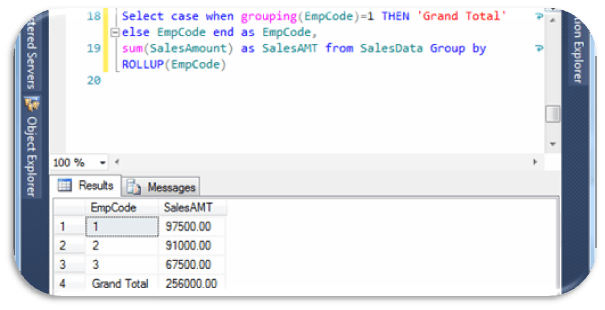
Here we can see clearly sum of all EmpCode with NULL title, Once a guy asked about this NULL , How to give Name for this Null as suppose ‘Grand Total’, here is some manipulation with tricky tips and we can get the desired output and we can also change it as where its required.

Select
case when grouping(EmpCode)=1 THEN ‘Grand Total’ else EmpCode end as EmpCode,
sum(SalesAmount
as SalesAMT from SalesData Group by ROLLUP(EmpCode)
will show result as,

In ROLLUP parameter we can also set multiple grouping set like ROLLUP(EmpCode,Year), hence ROLLUP outputs are hierarchy of values as per selected columns.

CUBE : The CUBE operator is specified in the GROUP BY clause of a SELECT statement. The select list contains the dimension columns and aggregate function expressions. The GROUP BY specifies the dimension columns by using the WITH CUBE keywords. The result set contains all possible combinations of the values in the dimension columns, together with the aggregate values from the underlying rows that match that combination of dimension values. CUBE generates a result set that represents aggregates for all combinations of values as per the selected columns. Let see the examples as per our TestData from SalesData Table.

Select EmpCode,SalesYear,sum(SalesAmountas SalesAMT from SalesData Group by CUBE(SalesYear,EmpCode)
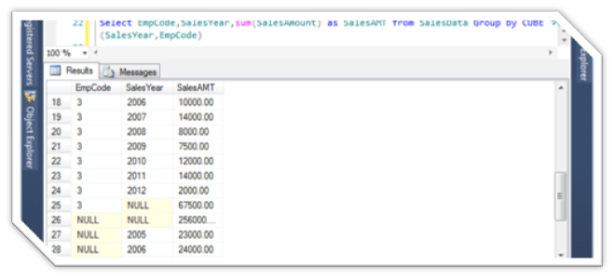
Will shows as

Select SalesYear,EmpCode,sum(SalesAmountas SalesAMT from SalesData Group by CUBE(SalesYear,EmpCode)

Will show as,
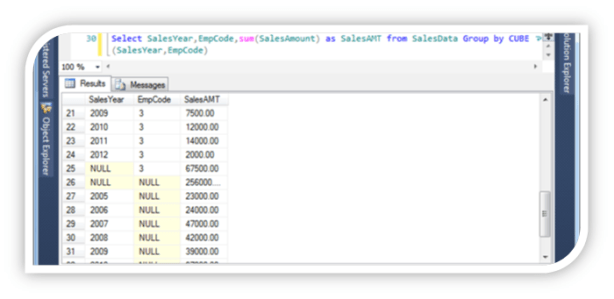

The ROLLUP and CUBE aggregate functions generate subtotals and grand totals as separate rows, and supply a null in the GROUP BY column to indicate the grand total.

the difference between the CUBE and ROLLUP operator is that the CUBE generates a result set that shows the aggregates for all combinations of values in the selected columns. By contrast, the ROLLUP operator returns only the specific result set.The ROLLUP operator generates a result set that shows the aggregates for a hierarchy of values in the selected columns. Also, the ROLLUP operator provides only one level of summarization

GROUPING SETS : The GROUPING SETS function allows you to choose whether to see subtotals and grand totals in your result set. Its allow us versatility as

  • include just one total
  • include different levels of subtotal
  • include a grand total
  • choose the position of the grand total in the result set
    Let See examples,

Select EmpCode,SalesYear,sum(SalesAmountas SalesAMT from SalesData Group by GROUPING SETS (SalesYear,EmpCode)
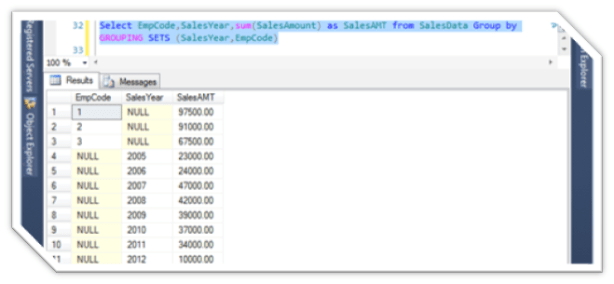

Select EmpCode,SalesYear,sum(SalesAmountas SalesAMT from SalesData Group by GROUPING SETS (EmpCode,SalesYear)
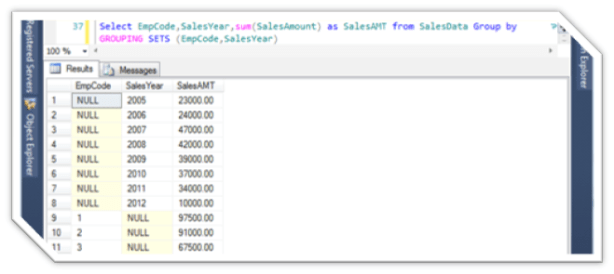
COMPUTE & COMPUTE BY: The summary values generated by COMPUTE appear as separate result sets in the query results. The results of a query that include a COMPUTE clause are like a control-break report. This is a report whose summary values are controlled by the groupings, or breaks, that you specify. You can produce summary values for groups, and you can also calculate more than one aggregate function for the same group.

When COMPUTE is specified with the optional BY clause, there are two result sets for each group that qualifies for the SELECT:

  • The first result set for each group has the set of detail rows that contain the select list information for that group.
  • The second result set for each group has one row that contains the subtotals of the aggregate functions specified in the COMPUTE clause for that group.

When COMPUTE is specified without the optional BY clause, there are two result sets for the SELECT:

  • The first result set for each group has all the detail rows that contain the select list information.
  • The second result set has one row that contains the totals of the aggregate functions specified in the COMPUTE clause.

Comparing COMPUTE to GROUP BY

To summarize the differences between COMPUTE and GROUP BY:

  • GROUP BY produces a single result set. There is one row for each group containing only the grouping columns and aggregate functions showing the subaggregate for that group. The select list can contain only the grouping columns and aggregate functions.
  • COMPUTE produces multiple result sets. One type of result set contains the detail rows for each group containing the expressions from the select list. The other type of result set contains the subaggregate for a group, or the total aggregate for the SELECT statement. The select list can contain expressions other than the grouping columns or aggregate functions. The aggregate functions are specified in the COMPUTE clause, not in the select list.

    Let See example

Select EmpCode,SalesYear,SalesAmount from SalesData order by EmpCode,SalesYear COMPUTE SUM(SalesAmount)

The COMPUTE and COMPUTE BY clauses are provided for backward compatibility. Instead, use the following components, both are discontinued from SQL Server 2012.

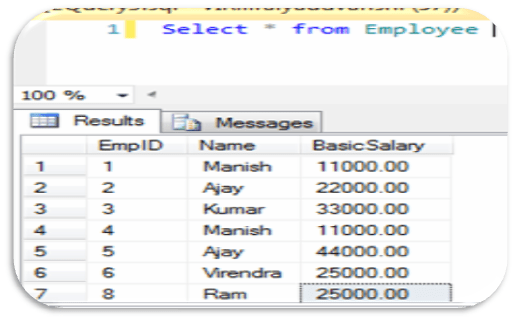
Magic Tables are invisible tables which created on MS SQL Server, during INSERT/UPDATE/DELETE operations on any table. These tables temporarily persists values before completing the DML statements.
Magic Tables are
internal table which is used by the SQL server to recover recently inserted, deleted and updated data into SQL server database. That is when we insert or delete any record from any table in SQL server then recently inserted or deleted data from table also inserted into inserted magic table or deleted magic table with help of which we can recover data which is recently used to modify data into table either use in delete, insert or update to table. Basically there are two types of magic table in SQL server namely: INSERTED and DELETED, update can be performed with help of these twos. When we update the record from the table, the INSERTED table contains new values and DELETED table contains the old values. Magic Tables does not contain the information about the Columns of the Data Type text , ntext or image. These are maintained by SQL Server for internal processing whenever an update,insert,Delete occur on table.
These
Magic tables is used In SQL Server 6.5, 7.0 & 2000 versions with Triggers only while in SQL Server 2005, 2008 & 2008 R2 Versions can use these Magic tables with Triggers and Non-Triggers also. Magic tables with Non-Trigger activities uses OUTPUT Clause in SQL Server 2005, 2008 & 2008 R2 versions.

Suppose we have Employee table, Now We need to create two triggers to see data with in virtual tables Inserted and Deleted and without triggers.

For INSERTED virtual table, using Trigger ( Magic Tables with Triggers)
CREATE TRIGGER trg_Emp_Ins ON Employee
FOR INSERT
AS
begin
/* Here you can write your required codes, but I am here putting only demostration of Magic Table.*/
Print ‘Data in INSERTED Table’
SELECT FROM INSERTED — It will show data in Inserted virtual table
Print ‘Data in DELETED Table’
SELECT FROM DELETED — It will show data in Deleted virtual table
end
–Now insert a new record in Employee table to see data with in Inserted virtual tables
INSERT INTO Employee(NameBasicSalaryVALUES(‘Virendra’,2000)

For INSERTED virtual table, without Trigger ( Magic Tables with Non-Triggers)

— Use INSERTED Magic Tables with OUTPUT Clause to Insert values in Temp Table or Table Variable

create table #CopyEMP(CName varchar(12),CDept varchar(12))
–Now insert a new record in Employee table to see data with in Inserted virtual tables

Insert into Employee(NameBasicSalaryOUTPUT INSERTED.NameINSERTED.BasicSalary into #CopyEMP values(‘Ram’,‘100’)
Select from #CopyEMP

For DELETED virtual table, using Trigger ( Magic Tables with Triggers)

CREATE TRIGGER trg_Emp_Ins OEmployee
FOR DELETE
AS
Begin
/* Here you can write your required codes, but I am here putting only demostration of Magic Table.*/
Print ‘INSERTED Table’
SELECT FROM INSERTED — It will show data in Inserted virtual table
Print ‘DELETED Table’
SELECT FROM DELETED — It will show data in Deleted virtual table
End
–Now Delete few records in Employee table to see data with in DELETED virtual tables
DELETE Employee where BasicSalary > 10000

For DELETED virtual table, without Trigger ( Magic Tables with Non-Triggers)

— Use DELETED Magic Tables with OUTPUT Clause to Insert values in Temp Table or Table Variable

create table #CopyEMP(CName varchar(12),CDept varchar(12))

–Now Delete record in Employee table to see data with in DELETED virtual tables

DELETE Employee where BasicSalary > 10000

Select from #CopyEMP

SQL Server 2005 introduced four new ranking functions: ROW_NUMBER, RANK, DENSE_RANK, and NTILE. These functions allow you to analyze data and provide ranking values to result rows of a query. For example, you might use these ranking functions for assigning sequential integer row IDs to result rows or for presentation, paging, or scoring purposes.

All four ranking functions follow a similar syntax pattern:

function_name() OVER([PARTITION BY partition_by_list] ORDER BY order_by_list)

The basic syntax follows.

ROW_NUMBER() OVER ([<partition_by_clause>] <order_by_clause>)
RANK() OVER ([<partition_by_clause>] <order_by_clause>)
DENSE_RANK() OVER([<partition_by_clause>]<order_by_clause>)
NTILE(integer_expression) OVER ([<partition_by_clause>] <order_by_clause>)


Ranking functions are a subset of the built in functions in SQL Server. They are used to provide a rank of one kind or another to a set of rows in a partition. The partition can be the full result set, if there is no partition. Otherwise, the partitioning of the result set is defined using the partition clause of the OVER clause. The order of the ranking within the partition is defined by the order clause of OVER. Order is required even though partition is optional.

ROW_NUMBER: ROW-NUMBER function returns a sequential value for every row in the results. It will assign value 1 for the first row and increase the number of the subsequent rows.

Syntax:

SELECT ROW_NUMBER() OVER (ORDER BY column-name), columns FROM table-name

OVER – Specify the order of the rows

ORDER BY – Provide sort order for the records


RANK: The RANK function returns the rank based on the sort order. When two rows have the same order value, it provide same rank for the two rows and also the ranking gets incremented after the same order by clause.

Syntax:
SELECT
RANK() OVER ([< partition_by_clause >] < order_by_clause >)

SELECT RANK() OVER ([< partition_by_clause >] < order_by_clause >)

Partition_by_clause – Set of results grouped into partition in which RANK function applied.
Order_by_clause – Set of results order the within the partition


In the above example, based on the sort order Employee Name, the Rank is given.
The first two rows in the list has same Employee Name, those rows are given same Rank, followed by the rank of next for another set of rows because there are two rows that are ranked higher. Therefore, the RANK function does not always return consecutive integers.


DENSE_RANK: The DENSE_RANK function is very similar to RANK and return rank without any gaps. This function sequentially ranks for each unique order by clause.

Syntax:
SELECT DENSE_RANK() OVER ([< partition_by_clause >] <order_by_clause>)</order_by_clause>

SELECT DENSE_RANK() OVER ([< partition_by_clause >] )

Partition_by_clause – Set of reults grouped into partition in which DENSE RANK function applied.
Order_by_clause – Set of results Order the within the partition


NTILE: NTILE () splits the set of rows into the specified number of groups. It equally splits the rows for each group when the number of rows is divisible by number of group. The number is incremented for every additional group. If the number of rows in the table is not divisible by total groups count (integer_expression), then the top groups will have one row greater than the later groups. For example if the total number of rows is 6 and the number of groups is 4, the first two groups will have 2 rows and the two remaining groups will have 1 row each

Syntax:
SELECT NTILE (integer_expression) OVER ([< partition_by_clause >] <order_by_clause>) </order_by_clause>

SELECT NTILE (integer_expression) OVER ([< partition_by_clause >] )

(integer_expression) – The number of groups into which each partition must be divided.


  • The EXCEPT operator returns the rows that are only in the first result set but not in the second. EXCEPT introduced from SQL Server 2005.
  • The NOT IN
    returns all rows from returned from by first result set which does not exist in the second select statement
  • When we combine two queries using EXCEPT clause, it will returns distinct rows from the first SELECT statement that are not returned by the second one.
  • EXCEPT clause works the same way as the UNION operator of SQL and MINUS clause in Oracle.

    The syntax of EXCEPT clause is as follow

SELECT
column1
[, column2 ]
FROM
table1
[, table2 ]
[WHERE condition]

EXCEPT

SELECT
column1
[, column2 ]
FROM
table1
[, table2 ]
[WHERE condition]

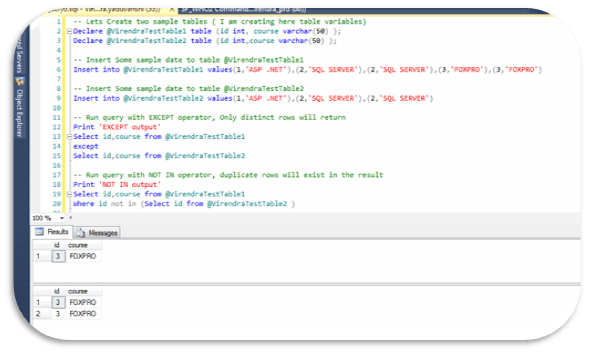
  • The difference between EXCEPT and NOT IN clause is EXCEPT operator returns all distinct rows from the rows returned by first select statement which does not exist in the rows returned by second select statement. On the other hand “NOT IN” will return all rows from returned by first select statement which does not exist in the rows returned by second select statement.

Below is example for same..

— Lets Create two sample tables ( I am creating here table variables)

Declare
@VirendraTestTable1
table (id
int,
course
varchar(50)
);

Declare
@VirendraTestTable2
table (id
int,course
varchar(50)
);


— Insert Some sample date to table @VirendraTestTable1

Insert
into
@VirendraTestTable1
values(1,‘ASP .NET’),(2,‘SQL SERVER’),(2,‘SQL SERVER’),(3,‘FOXPRO’),(3,‘FOXPRO’)


— Insert Some sample date to table @VirendraTestTable2

Insert
into
@VirendraTestTable2
values(1,‘ASP .NET’),(2,‘SQL SERVER’),(2,‘SQL SERVER’)


— Run query with EXCEPT operator, Only distinct rows will return

Print
‘EXCEPT output’

Select
id,course
from
@VirendraTestTable1

except

Select
id,course
from
@VirendraTestTable2


— Run query with NOT IN operator, duplicate rows will exist in the result

Print
‘NOT IN output’

Select
id,course
from
@VirendraTestTable1

Where
id
not
in
(Select
id
from
@VirendraTestTable2
)


Hence conclusion is ,

EXCEPT is defined in terms of duplicates based on distinctness, and for example (1 is distinct from 1) is false, (1 is distinct from NULL) is true and (NULL is distinct from NULL) if false.

NOT IN is defined in terms of equality, and for example, (1=1) is true,(1=NULL) is unknown and (NULL=NULL) is unknown.