Archive for the ‘Database Administrator’ Category

A data-tier application is an entity that contains all of the database and instance objects used by an application. It provides a single unit for authoring, deploying and managing the data tier objects, instead of having to manage them separately through scripts. A Dedicated Administrator Connection (DAC) allows tighter integration of data tier development and gives administrators an application level view of resource usage in their systems.

Data Tier Applications can be developed using Visual Studio, and then be deployed to a database using the Data Tier Deployment Wizard.

You can also Extract a Data-Tier Application for usage in Visual Studio, or easily deploy to a different instance of SQL Server, including a SQL Azure instance.


Let see a step by step example
A)
Extracting a Data Tier Application

  1. Suppose First server named as VIRENDRA1_SQL2012, and DB Name is as VIRENDRATEST
  2. Now from SQL Server Management Studio Object Explorer, right click on VIRENDRATEST on VIRENDRA1_SQL2012
  3. Click Tasks |Extract Data-Tier Application
  4. As the Data Tier Application Wizard displays, click Next
  5. In the Set Properties Window specify C:\VIRENDRATEST.dacpac
    as the filename under Save to DAC package file
  6. If promped that the file is already existing, replace the existing file.
  7. Click Next
  8. On the Validation and Summary Page, click Next
  9. As the Data Extraction completes, click Finish.

You have now successfully exported a Database as a Data-Tier Application.

B) Deploying a Data Tier Application

  1. Suppose First server named as VIRENDRA2_SQL2012, and DB Name is as VIRENDRATEST
  2. In SQL Server Management Studio Object Explorer, Right-Click VIRENDRA2_SQL2012
  3. Select Deploy Data Tier Application
  4. As the Introduction Page displays, click Next
  5. In the Select Package Window Browse to C:\VIRENDRATEST.dacpac
  6. Select the Data Tier Application Package you previously exported
  7. Click Next
  8. As Package Validation completes, click Next on the Update Configuration Page
  9. Click Next on the Summary Page
  10. As Deployment completes, click Finish

You have now successfully deployed a Data Tier Application to a SQL Server Instance running on a different server.
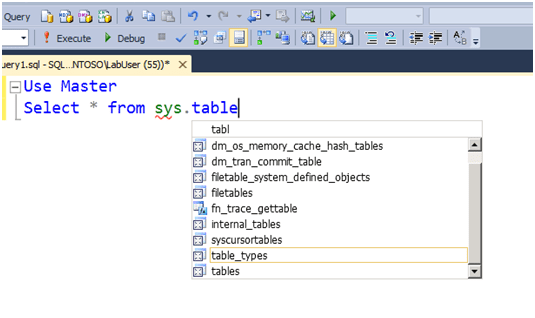
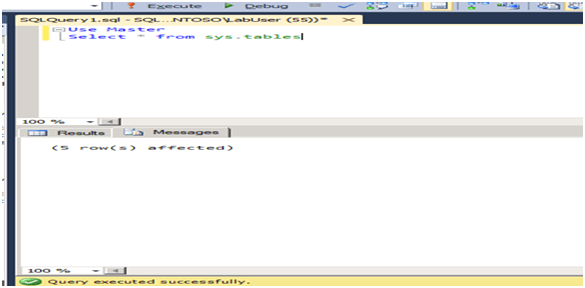
Here are some new SSMS 2012 features as

  1. Exploring Intellisense Enhancement – Enhanced Intellisense will now provide partial syntax completion, while in previous versions Intellisense would only display the objects that start with the syntax you started typing.
    Let see example

Its showing all objects which contain “TABLE”.

2) At the bottom left corner of the query window, notice there is a Zoom window that displays 100%, change this to 150%. The enhancement to be able to zoom in the query window enables you to read queries more accurately. Its for results message windows too.

3) Code Snippets are an enhancements to the Template Feature that was introduced in SQL Server Management Studio. You can also create and insert your own code snippets, or Import them from a pre-created snippet library.

Hi, Here are some Differences between SQL Server 2008/R2 and 2012.

Sr. No.

SQL Server 2008

SQL Server 2012

1 Exceptions handle using TRY….CATCH Unique Exceptions handling with THROW
2 High Availability features as Log Shipping, Replication, Mirroring & Clustering New Feature ALWAYS ON introduced with addition of 2008 features.
3 Web Development and Business Intelligence Enhanced with business intelligence features. Excel PowerPivot by adding more drill and KPI through. In Addition with SQL server 2008, Web Development and Business Intelligence Enhanced with business intelligence features and Excel PowerPivot by adding more drill and KPI’s.
4 Could not supported for Windows Server Core Support. Supported for Windows Server Core Support
5 Columnstore Indexes not supported. New Columnstore Indexes feature that is completely unique to SQL Server. They are special type of read-only index designed to be use with Data Warehouse queries. Basically, data is grouped and stored in a flat, compressed column index, greatly reducing I/O and memory utilization on large queries.
6 PowerShell Supported Enhanced PowerShell Supported
7 Distributed replay features not available. Distributed replay allows you to capture a workload on a production server, and replay it on another machine. This way changes in underlying schemas, support packs, or hardware changes can be tested under production conditions.
8 PowerView not available in BI features PowerView is a fairly powerful self-service BI toolkit that allows users to create mash ups of BI reports from all over the Enterprise.
9 EXECUTE … with RECOMPLIE feature Enhanced EXECUTE with many option like WITH RESULT SET….
10 Maximum numbers of concurrent connections to SQL Server 2008 is 32767 SQL server 2012 has unlimited concurrent connections.
11 The SQL Server 2008 uses 27 bit bit precision for spatial calculations.
The SQL Server 2012 uses 48 bit precision for spatial calculations
12 TRY_CONVERT() and FORMAT() functions are not available in SQL Server 2008
TRY_CONVERT() and FORMAT() functions are newly included in SQL Server 2012
13 ORDER BY Clause does not have OFFSET / FETCH options for paging ORDER BY Clause have OFFSET / FETCH options for paging
14 SQL Server 2008 is code named as Katmai. SQL Server 2012 is code named as Denali
15 In SQL Server 2008, audit is an Enterprise-only feature. Only available in Enterprise, Evaluation, and Developer Edition. In SQL Server 2012,support for server auditing is expanded to include all editions of SQL Server.
16 Sequence is not available in SQL Server 2008
Sequence is included in SQL Server 2012.Sequence is a user defined object that generates a sequence of a number
17 The Full Text Search in SQL Server 2008 does not allow us to search and index data stored in extended properties or metadata. The Full Text Search in SQL Server 2012 has been enhanced by allowing us to search and index data stored in extended properties or metadata. Consider a PDF document that has “properties” filled in like Name, Type, Folder path, Size, Date Created, etc. In the newest release of SQL Server, this data could be indexes and searched along with the data in the document itself. The data does have to be exposed to work, but it’s possible now.
18 Analysis Services in SQL Server does not have BI Semantic Model
Analysis Services will include a new BI Semantic Model (BISM). BISM is a

(BISM) concept. 3-layer model that includes: Data Model, Business Logic and Data Access

19 The BCP not support –K Option. The BCP Utility and SQLCMD Utility utilities enhanced with -K option, which allows to specify read-only access to a secondary replica in an AlwaysOn availability group.
20 sys.dm_exec_query_stats  sys.dm_exec_query_stats  added four columns to help troubleshoot long running queries. You can use the total_rows, min_rows, max_rows and last_rows aggregate row count columns to separate queries that are returning a large number of rows from problematic queries that may be missing an index or have a bad query plan.

Other more precious features will be added with this document very soon.
J

As a DBA we have to maintain our all databases Dictionaries, Here is a Script , from which we can generate a full view of Tables structure details.

SELECT a.Name  [Table Name],
b.name  [Column Name],
c.name  [Data Type],
b.length [Column Length],
b.isnullable [Allow Nulls],
CASE WHEN d.name is null  THEN 0 ELSE 1 END  [Primary Key],
CASE WHEN e.parent_object_id is null THEN 0 ELSE 1 END [ForiegnKey],
CASE WHEN e.parent_object_id is null
THEN ‘-‘ ELSE g.name END [Reference Table],
       CASE WHEN h.value is null THEN ‘-‘ ELSE h.value END [Description]
from sysobjects as a
join syscolumns as on a.id b.id
join systypes as on b.xtype  c.xtype
left join (SELECT so.id,sc.colid,sc.name FROM syscolumns sc
JOIN sysobjects so ON o.id sc.id
JOIN sysindexkeys si ON so.id si.id and sc.colid  si.colid
WHERE si.indid = 1on a.id d.id and b.colid d.colid
Left join sys.foreign_key_columns as on a.id e.parent_object_id
          and b.colid e.parent_column_id
left join sys.objects as on e.referenced_object_id g.object_id
left join sys.extended_properties as on a.id h.major_id
and b.colid h.minor_id
where a.type ‘U’
order by a.name

We can also get somehow details, not as above , using below

SELECT  FROM INFORMATION_SCHEMA.COLUMNS

JJJ

Here are initial tips for writing efficient/  cost-effective Queries

  • When using ANDput the condition least likely to be true first. The database system evaluates conditions from left to right, subject to operator precedence. If you have two or more AND operators in a condition, the one to the left is evaluated first, and if and only if it’s true is the next condition evaluated. Finally, if that condition is true, then the third condition is evaluated. You can save the database system work, and hence increase speed, by putting the least likely condition first. For example, if you were looking for all members living in Delhi and born before January 1, 1960, you could write the following query:
    SELECT  FirstName LastName  FROM  EMPLOYEE  WHERE  State  ‘Delhi’  AND  DateOfBirth  ‘1960-01-01’
    The query would work fine; however, the number of members born before that date is very small, whereas plenty of people live in New State. This means that State = Delhi will occur a number of times and the database system will go on to check the second condition, DateOfBirth < ‘1960-01-01’. If you swap the conditions around, the least likely condition (DateOfBirth < ‘1960-01-01’) is evaluated first:
    SELECT  FirstName LastName  FROM  MemberDetails  WHERE
    DateOfBirth  ‘1960-01-01’  AND  State  ‘Delhi’;
    Because the condition is mostly going to be false, the second condition will rarely be executed, which saves time. It’s not a big deal when there are few records, but it is when there are a lot of them.
  • When using ORput the condition most likely to be true first. Whereas AND needs both sides to be true for the overall condition to be true, OR needs only one side to be true. If the left-hand side is true, there’s no need for OR to check the other condition, so you can save time by putting the most likely condition first. Consider the following statement:
    SELECT  FirstName LastName  FROM  MemberDetails  WHERE  State
    ‘Delhi’  OR  DateOfBirth  ‘1960-01-01’;
    If Delhi is true, and it is true more often than DateOfBirth < ‘1960-01-01’ is true, then there’s no need for the database system to evaluate the other condition, thus saving time.
  • DISTINCT can be faster than GROUP BYDISTINCT and GROUP BY often do the same thing: limit results to unique rows. However,DISTINCT is often faster with some database systems than GROUP BY. For example, examine the following GROUP BY:

    SELECT  MemberId  FROM  Orders  GROUP  BY  MemberId;
    The 
    GROUP BY could be rewritten using the DISTINCT keyword:
    SELECT  DISTINCT  MemberId  FROM  Orders

  • Use IN with your subqueries. When you write a query similar to the following, the database system has to get all the results from the subquery to make sure that it returns only one value,
    SELECT  FirstName LastName  FROM  EMPLOYEE  WHERE
    EMPID  (SELECT  EMPID  FROM  Orders  WHERE  OrderId  = 2);
    If you rewrite the query using the IN operator, the database system only needs to get results until there’s a match with the values returned by the subquery; it doesn’t necessarily have to get all the values:

    SELECT  FirstName LastName  FROM  EMPLOYEE  WHERE  EMPID  IN (SELECT  EMPID  FROM  Orders  WHERE  OrderId  = 2);

  • Avoid using SELECT * FROM. Specifying which columns you need has a few advantages, not all of them about efficiency. First, it makes clear which columns you’re actually using. If you use SELECT * and actually use only two out of seven of the columns, it’s hard to guess from the SQL alone which ones you’re using. If you say SELECT FirstName, LastName…..then it’s quite obvious which columns you’re using. From an efficiency standpoint, specifying columns reduces the amount of data that has to pass between the database and the application connecting to the database. This is especially important where the database is connected over a network.
  • Search on integer columns. If you have a choice, and often you don’t, search on integer columns. For example, if you are looking for the member whose name is VIRENDRA YADUVANSHI and whose MemberId is 101, then it makes sense to search via the MemberId because it’s much faster.

Here is the complete list of Deprecated Database Engine Features in SQL Server 2012. This topic describes the deprecated SQL Server Database Engine features that are still available in SQL Server 2012. These features are scheduled to be removed in a future release of SQL Server. Deprecated features should not be used in new applications.
For more please visit
http://msdn.microsoft.com/en-us/library/ms143729.aspx

Its sometime happened, our DC (Main Primary DB Instance) may be down due to some reasion and we have to start our log shipped Secondary Server which is at DR location, needs to act as Primary Server for smooth Production.

In my Example lets Primary Server is named as ‘PRIMARY’ and DB which is used for Log shipping at server ‘SECONDARY’ is VIRENDRATEST.

Now suppose I would like to change my PRIMARY Server’s production environment as a ‘SECONDARY’ and ‘SECONDARY’ as a PRIMARY. Below are the steps for same.

  1. First be sure, all applications hits are stopped to DB server. For same we have to contact Application Team/Production to STOP/DISABLE the services/Application, After confirmation from there let go ahead.
  2. Take Full BACKUP of PRIMARY Server’s DB.
  3. Run LS-Backup Job at Primary Server and Disable it.
  4. Run LS-Copy Job at SECONDARY Server , after complition of this, disable this job.
  5. Run LS-Restore job at Secondary Server and after completion of it, Disable it
  6. Now Take LOG Backup from PRIMARY server as using command as
    BACKUP LOG VIRENDRATEST TO Disk=N’D:\LS_BACKUP\VIRENDRATESTLOG.BAK’ WITH NORECOVERY
  7. Copy LOG Backup file(of Step 6) of PRIMARY at SCECONDARY server manually.
  8. At SECONDARY , restores last BACKUP LOG file with option WITH RECOVERY
  9. Now our SECONDARY Server’s DB is up for production and PRIMARY Server’s DB is in RESTORING mode
  10. Now Configure LOG SHIPPING again at SECONDARY as PRIMARY and PRIMARY as SECONDARY.
  11. Run LS-Backup Job at newly PRIMARY server.
  12. Refresh both servers instance, both server should be in sysn order with proper status.
  13. Check the Logshipping where its working properly or not
  14. Inform to Production team to Start/Enable all Application/Services

I found a very powerful SSMS add-in as SSMSBoost.
“SSMS Boost add-in” is designed to improve productivity when working with Microsoft SQL Server in SQL Server Management Studio. The main goal of project is to speed-up daily tasks of SQL DBA and T-SQL developers. Please visit http://www.ssmsboost.com/ for more details and download and enjoy!

RAISERROR:

RAISERROR raise an error with a user defined error message. The error message is either created dynamically or stored in the system table sysmessages.

Example: Lets create a SP, pass 2 number, if second number is 0, then error as .

CREATE PROCEDURE SPDivision @FirstNumber int@SecondNumber int
AS
    IF 
@SecondNumber=0
B
EGIN
SELECT ‘Error’
R
AISERROR (‘Error: Division by zero.’, 16, 1)
     END
   ELSE
     select @
FirstNumber/@SecondNumber

When Run SP as  EXEC SPDivision 5, 0   will show error as

(1 row(s) affected)
Msg 50000, Level 16, State 1, Procedure spDivision, Line 6
Error: Division by zero.

If the error message is used in many SP’s, to avoid inconsistencies due to changes in the message, the message can be stored in sysmessages.. The system SP sp_addmessage can be used to add the message and sp_dropmessage fro drop message. Be sure User-Defined error messages must have a msg_id greater or equal to 50001.

Example: To add an error message into sysmessages..

EXEC sp_addmessage 50001, 16‘Error: Division by zero.’

Now above SP code will be as

CREATE PROCEDURE spDivision @FirstNumber int@SecondNumber int
AS
   IF 
@SecondNumber=0
     BEGIN
       SELECT 
‘Error’
       RAISERROR (50001, 16, 1)
    END
    ELSE
    Select 
@FirstNumber/@SecondNumber 

@@ERROR:

The system function @@ERROR returns an error code if an error was encountered after the completion of the TSQL statement immediately preceding it, otherwise it will return 0, means success. The value of @@ERROR changes for each TSQL statement and the only way to keep track of errors is by using a temporary variable to store the error code. If there is no need to keep track of the error but simply act upon it, then the value of @@ERROR can be checked after the TSQL statement to be tested.

CREATE PROCEDURE spDivision @FirstNumber int@SecondNumber int
  AS
    DECLARE 
@errnum int
    Select 
@FirstNumber/@SecondNumber
    SET 
@errnum=@@Error
IF @errnum<>0
S
ELECT ‘Error’

 EXEC spDivision1 5,0

Msg 8134, Level 16, State 1, Procedure spDivision, Line 4
Divide by zero error encountered.
(1 row(s) affected)

The return code is changed automatically to store the latest @@Error value if no RETURN statement is present. Even if there are more statements after the error occurred, the error code is still preserved.

Locking is a means of not allowing any other transaction to take place when one is already in progress. In this the data is locked and there won’t be any modification taking place till the transaction either gets successful or it fails. The lock has to be put up before the processing of the data whereas Multi-Versioning is an alternate to locking to control the concurrency. It provides easy way to view and modify the data. It allows two users to view and read the data till the transaction is in progress. Multiversion concurrency control is described in some detail in the 1981 paper “Concurrency Control in Distributed Database Systems” by Philip Bernstein and Nathan Goodman.
Multi-Versioning, As the name implies, each record in the system might have multiple versions visible to different transactions. When a transaction modifies a record, a new version is written to the database, and a previous version, representing only the difference between the version of the record that was read by the transaction and the new value of the record, is written as a back version of that record.
Read committed isolation using row versioning is somewhere in between Locks and Multi-Versioning. Under this isolation level, read operations do not acquire locks against the active live data. However, with update operations the process is the same for this isolation level as it is for the default read committed isolation level, The selection of rows to update is done by using a blocking scan where an update lock is taken on the data row as data values are read.
Snapshot isolation uses purely Multi-Versioning because data that is to be modified is not actually locked in advance, but the data is locked when it is selected for modification. When a data row meets the update criteria, the snapshot transaction verifies that the data has not been modified by another transaction after the snapshot transaction started. If the data has not been modified by another transaction, the snapshot transaction locks the data, updates the data, releases the lock, and moves on. If the data has been modified by another transaction, an update conflict occurs and the snapshot transaction rolls back.
Although locking can be the best concurrency-control choice for applications that require data consistency and inter-transaction protection, it can cause writers to block readers. If a transaction changes a row, another transaction cannot read the row until the writer commits. There are cases where waiting for the change to complete is the correct response; however, there are cases where the previous transactionally consistent state of the row is enough.