Statistics Details in SQL Server

Posted: November 8, 2011 by Virendra Yaduvanshi in SQL General

SQL Server tries to use statistics to react intelligently in its query optimization. Knowing number of records, density of pages, histogram, or available indexes help the SQL Server optimizer guess more accurately how it can best retrieve data. A common misnomer is that if you have indexes, SQL Server will use those indexes to retrieve records in your query.

Below is the query using DMVs to find out statistics details about current database’s tables.

SELECT
OBJECT_NAME(A.OBJECT_ID)
AS Object_Name,

A.name AS index_name, a.type_desc AS Index_Type,STATS_DATE(A.OBJECT_ID, index_id)
AS StatsUpdated ,DATEDIFF(d,STATS_DATE(A.OBJECT_ID, index_id),getdate()) DaysOld

FROM
sys.indexes A

INNER
JOIN
sys.tables B ON A.object_id = B.object_id

WHERE A.name IS
NOT
NULL

ORDER
BY
DATEDIFF(d,STATS_DATE(A.OBJECT_ID, index_id),getdate())
DESC
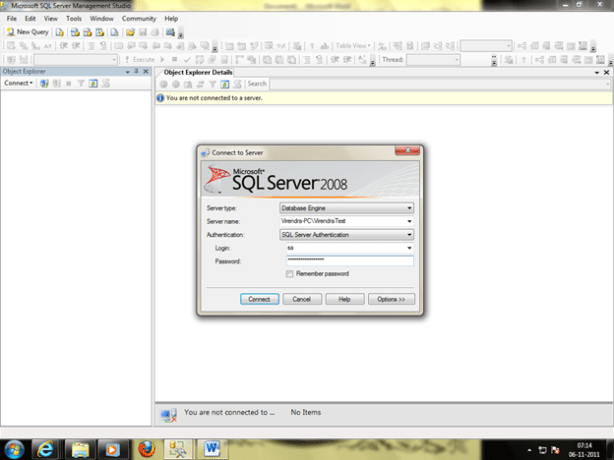


As we know, by default, tempdb is placed on the same drive where SQL Server Instance installed on. Sometime its happened that where its installed, that disk space is running in very tight position or disk I/O operation is very slow or not performing upto mark. The solution is to move tempdb to a spacious and faster drive and improve performance, follow these steps:


1. Open SQL Server Management Studio.

Click on Start -> Programme -> MicroSoft SQL Server 2005 / MicroSoft SQL Server 2008 -> SQL Server Management Studio

2. Connect to the desired server.


3. Click the New Query button.


4. Copy and paste the following into the query pane to check the TEMPDB location

SELECT name, physical_name AS CurrentLocation FROM
sys.master_files

WHERE database_id =
DB_ID(N’tempdb’);

GO

5. Now, Suppose you want to move TEMPDB at D:\SQLDATA, simply copy and paste the following in the query pane.

USE
master

GO

ALTER
DATABASE tempdb

MODIFY
FILE (NAME = tempdev, FILENAME
=
‘d:\SQLData\tempdb.mdf’);

GO

ALTER
DATABASE tempdb

MODIFY
FILE (NAME = templog, FILENAME
=
‘d:\SQLData\templog.ldf’);

GO

6. Click Execute, result may be like this,


7. Now, We have to restart SQL Server Service using via Start-> Run -> Services.msc


Or

Start -> Programme- MicroSoft SQL Server 2005 / MicroSoft SQL Server 2008 ->Configuration Tools -> SQL Server Configuration Manager


8. Stop and Start SQL Server (MSSQLSERVER).

9. Go back to SQL Server Management Studio and open a new query pane.

10. Copy and paste the following to verify that tempdb has moved to the new location:

SELECT name, physical_name AS CurrentLocation FROM
sys.master_files

WHERE database_id =
DB_ID(N’tempdb’);

GO

11. Click Execute.

12. In the physical_name column, you should see the path to the new location.

SQL Server restart time

Posted: September 21, 2011 by Virendra Yaduvanshi in SQL General
Tags:

——1)From TempDB created date using sys.databases

            SELECT create_date from sys.Databases where database_id=2

——2)From TempDB created date using sys.sysdatabases    

            SELECT crdate from sys.sysDatabases where DBID =2

——3)From sysprocesses    

SELECT login_time FROM master..sysprocesses WHERE cmd = ‘LAZY WRITER’

——4)From sysprocesses

SELECT min(login_time) from master..sysprocesses

——5)From sysprocesses

SELECT min(login_time) from sys.sysprocesses

——6)From sp_readerrorlog SP

  sp_readerrorlog 0,1,’Copyright (c)’

——7)From dm_os_sys_info

SELECT sqlserver_start_time FROM sys.dm_os_sys_info

——8)From dm_exec_sessions

SELECT login_time FROM sys.dm_exec_sessions WHERE session_id = 1

——9)From traces

SELECT start_time from sys.traces where is_default = 1

——10)From sp_helpdb

sp_helpdb ‘tempdb’


USE VirendraTest
GO

CREATE TABLE #Virendratemp (
table_name sysname ,
row_count INT,
reserved_size VARCHAR(50),
data_size VARCHAR(50),
index_size VARCHAR(50),
unused_size VARCHAR(50))

SET NOCOUNT ON

INSERT #Virendratemp
EXEC sp_msforeachtable ‘sp_spaceused ”?”’

SELECT a.Table_Name,
a.Row_count,
COUNT(*) AS Col_count,
a.Data_size
FROM #Virendratemp a
INNER JOIN information_schema.columns b
ON a.table_name collate database_default
= b.table_name collate database_default
GROUP BY a.table_name, a.row_count, a.data_size
ORDER BY CAST(REPLACE(a.data_size, ‘ KB’, ”) AS integer) DESC

DROP TABLE #Virendratemp

In 1988, Microsoft released its first version of SQL Server. It was developed jointly by Microsoft and Sybase for the OS/2 platform.

• 1993 – SQL Server 4.21 for Windows NT
• 1995 – SQL Server 6.0, codenamed SQL95
• 1996 – SQL Server 6.5, codenamed Hydra
• 1999 – SQL Server 7.0, codenamed Sphinx
• 1999 – SQL Server 7.0 OLAP, codenamed Plato
• 2000 – SQL Server 2000 32-bit, codenamed Shiloh (version 8.0)
• 2003 – SQL Server 2000 64-bit, codenamed Liberty
• 2005 – SQL Server 2005, codenamed Yukon (version 9.0)
• 2008 – SQL Server 2008, codenamed Katmai (version 10.0)
• 2010 – SQL Server 2008 R2, Codenamed Kilimanjaro (aka KJ)
• Next – SQL Server 2011, Codenamed Denali