In case of following

  • Adding a new column to the middle of the table
  • Dropping a column
  • Changing column nullability
  • Changing the order of the columns
  • Changing the data type of a column

SSMS’s table designer may throw following error,

Saving changes is not permitted. The changes that you have made require the following tables to be dropped and re-created. You have either made changes to a table that can’t be re-created or enabled the option Prevent saving changes that require the table to be re-created.

This message problem occurs when the Prevent saving changes that require the table re-creation option is enabled, to resolve this, follow the steps as

Click the Tools menu, click Options, expand Designers, and then click Table and Database Designers. Select or clear the Prevent saving changes that require the table to be re-created check box.
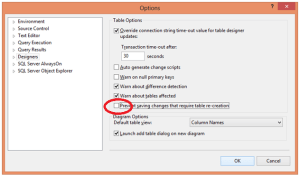
122612_2258_SSMSErrorSa1.png

Image  —  Posted: December 26, 2012 by Virendra Yaduvanshi in Database Administrator
Tags: , , , , , ,

Its general understanding that @@SERVERNAME and SERVERPROPERTY(‘SERVERNAME’) will return same values. But once I get a different values for both means both

Select @@SERVERNAME
Select 
SERVERPROPERTY(‘SERVERNAME’)
were returning different name, 
I got answer @ BOL as 

@@SERVERNAME function and the SERVERNAME property of SERVERPROPERTY function may return strings with similar formats, the information can be different. The SERVERNAME property automatically reports changes in the network name of the computer.In contrast, @@SERVERNAME does not report such changes. @@SERVERNAME reports changes made to the local server name using the sp_addserver or sp_dropserver stored procedure.

To resolve the issue, Just follow below steps,

— To see Servername

sp_helpserver

— Removes server from the list of known servers on the local instance of SQL Server.

sp_dropserver ‘WRON_SERVER_NAME’null

— Add server to the local instance of SQL Server.

sp_addserver ‘REAL_SERVER_NAME’,‘LOCAL’

A successful upgrade to SQL Server 2008 R2/2012 should be smooth and trouble-free. To achieve that smooth transition, we must have to devote a plan sufficiently for the upgrade, and match the complexity of database application, otherwise, it risk costly and stressful errors and upgrade problems. Like all IT projects, planning for every Contingency/eventuality and then testing our plan gives us confidence that will succeed. Any ignorance may increase the chances of running into difficulties that can derail and delay upgrade.

Upgrade scenarios will be as complex as our underlying applications and instances of SQL Server. Some scenarios within environment might be simple, other scenarios complex. Start to plan by analyzing upgrade requirements, including reviewing upgrade strategies, understanding SQL Server hardware and software requirements for specific version, and discovering any blocking problems caused by backward-compatibility issues.

There may be two Upgrade Scenarios as In-Place Upgrade and Side by side upgrade.

In-Place Upgrade : By using an in-place upgrade strategy, the SQL Server 2008 R2 Setup program directly replaces an instance of SQL Server 2000 or SQL Server 2005 with a new instance of SQL Server 2008 R2 on the same x86 or x64 platform. This kind of upgrade is called “in-place” because the upgraded instance of SQL Server 2000 or SQL Server 2005 is actually replaced by the new instance of SQL Server 2008 R2. You do not have to copy database-related data from the older instance to SQL Server 2008 R2 because the old data files are automatically converted to the new format. When the process is complete, the old instance of SQL Server 2000 or SQL Server 2005 is removed from the server, with only the backups that you retained being able to restore it to its previous state.

Note: If you want to upgrade just one database from a legacy instance of SQL Server and not upgrade the other databases on the server, use the side-by-side upgrade method instead of the in-place method.


Side by side upgrade : 
In a side-by-side upgrade, instead of directly replacing the older instance of SQL Server, required database and component data is transferred from an instance of SQL Server 2000 or SQL Server 2005 to a separate instance of SQL Server 2008 R2. It is called a “side-by-side” method because the new instance of SQL Server 2008 R2 runs alongside the legacy instance of SQL Server 2000 or SQL Server 2005, on the same server or on a different server.

There are two important options when you use the side-by-side upgrade method:

  • You can transfer data and components to an instance of SQL Server 2008 R2 that is located on a different physical server or on a different virtual machine, or
  • You can transfer data and components to an instance of SQL Server 2008 R2 on the same physical server
    Both options let you run the new instance of SQL Server 2008 R2 alongside the legacy instance of SQL Server 2000 or SQL Server 2005. Typically, after the upgraded instance is accepted and moved into production, you can remove the older instance.

A side-by-side upgrade to a new server offers the best of both worlds: You can take advantage of a new and potentially more powerful server and platform, but the legacy server remains as a fallback if you encounter a problem. This method could also potentially reduce an upgrade downtime by letting you have the new server and instances tested, up, and running without affecting a current server and its workloads. You can test and address hardware or software problems encountered in bringing the new server online, without downtime of the legacy system. Although you would have to find a way to export data out of the new system to go back to the old system, rolling back to the legacy system would still be less time-consuming than a full SQL Server reinstall and restoring the databases, which a failed in-place upgrade would require. The downside of a side-by-side upgrade is that increased manual interventions are required, so it might take more preparation time by an upgrade/operations team. However, the benefits of this degree of control can frequently be worth the additional effort.

Source: SQL Server 2008 Upgrade Technical Reference Guide

SQL Server 2012–SQL Server Data Tools is available as a free component of the SQL Server platform and is available for all SQL Server users. provides an integrated environment for database developers to carry out all their database design work for any SQL Server platform (both on and off premise) within Visual Studio. Database developers can use the SQL Server Object Explorer in Visual Studio to easily create or edit database objects and data, or execute queries.
Developers will also appreciate the familiar VS tools we bring to database development, specifically; code navigation, IntelliSense, language support that parallels what is available for C# and VB, platform-specific validation, debugging and declarative editing in the TSQL Editor, as well as a visual Table Designer for both database projects and online database instances.
SQL Server Data Tools (SSDT) is the final name for the product formerly known as SQL Server Developer Tools, Code-Named “Juneau”. SSDT provides a modern database development experience for the SQL Server and SQL Azure Database Developer. As the supported SQL Azure development platform, SSDT will be regularly updated online to ensure that it keeps pace with the latest SQL Azure features.

After so lots of google, I got a very nice link for a Large collection of Free Microsoft eBooks including: SharePoint, Visual Studio, Windows Phone, Windows 8, Office 365, Office 2010, SQL Server 2012, Azure, and more. Here is link

http://blogs.msdn.com/b/mssmallbiz/archive/2012/07/27/large-collection-of-free-microsoft-ebooks-for-you-including-sharepoint-visual-studio-windows-phone-windows-8-office-365-office-2010-sql-server-2012-azure-and-more.aspx

another link is http://social.technet.microsoft.com/wiki/contents/articles/11608.e-book-gallery-for-microsoft-technologies.aspx

Happy Reading! JJJ

The link  http://technet.microsoft.com/en-us/library/cc917589.aspx is a complete SQL server system error details listing . We can also get same using query as

Select from Sys.Messages

It’s a connectivity problem with a previously opened session in SQL Server, Sometimes a user can get SQL server error as

Msg 10054, Level 20, State 0, Line 0
A transport-level error has occurred when sending the request to the server. (provider: TCP Provider, error: 0 – An existing connection was forcibly closed by the remote host.)

Some possible causes are as below

  1. The server has been restarted, this will close the existing connections.
  2. Someone has killed the SPID that is being used.
  3. Network Failure
  4. SQL Services restarted

RESOLUTION : Just hit F5 or (ALT + X) to re-run your query. SSMS will determine it is no longer connected and then prompt you to reconnect it will put you back into the same database.

As we know Sequence is new enhanced feature introduced in SQL Server 2012. SEQUENCE work similarly to an IDENTITY value, but where the IDENTITY value is scoped to a specific column in a specific table, the Sequence Object is scoped to the entire database and controlled by application code.  This can allow us to synchronize seed values across multiple tables that reference one another in a parent child relationship.  Or, with a little bit of code we can also take control on whether or not the next value is used or saved for the next INSERT should the current transaction be rolled back where the IDENTITY value is lost and creates a gap when an INSERT is rolled backed. Here are some key differences as

Sequence

Identity

A SQL Server sequence object generates sequence of numbers just like an identity column in sql tables. But the advantage of sequence numbers is the sequence number object is not limited with single SQL table. IDENTITY is a table specific.
The status of the sequence object can be viewed by querying the DMV sys.sequences as shown below.
SELECT
Name,start_value,minimum_value,maximum_value
,current_value

FROM
sys.sequences

System Function @@IDENTITY

can use for the last-inserted identity value

Sequence is an object.
Example :
CREATE
SEQUENCE
MySequesnceName

AS
INT

START
WITH 1

INCREMENT
BY 1

MINVALUE 1

MAXVALUE 1000

NO
CYCLE

NO
CACHE

Identity is a property in a table.

Example :

CREATE
TABLE
TblIdentityChk

(

ID
INT
Identity (1,1),

CUSTNAME
Varchar(50)

)


You can obtain the new value before using it in an INSERT statement You cannot obtain the new value in your application before using it
In the sequence, you do not need to insert new ID, you can view the new ID directly.

Example :

SELECT NEXT VALUE FOR MySequesnceName

If you need a new ID from an identity column you need to
insert and then get new ID.

Example :

Insert into TblIdentityChk Values(‘TEST CUSTOMER’)

GO

SELECT @@IDENTITY AS ‘Identity’

–OR

Select SCOPE_IDENTITY() AS‘Identity’

You can add or remove a default constraint defined for a column with an expression that generates a new sequence value (extension to the standard) You cannot add or remove the property from an existing column
You can generate new values in an UPDATE statement, let see example as
UPDATE
TableName
SET
IDD
=
Next
Values
for
MySequesnceName
You cannot generate new values in an UPDATE statement when needed, rather only in INSERT statements
In the sequence, you can simply add one property to make it a cycle.

Example :

ALTER SEQUENCE MySequesnceName

CYCLE;

You cannot perform a cycle in identity column. Meaning, you cannot restart the counter after a
particular interval.
The semantics of defining ordering in a multi-row insert are very clear using an OVER clause (extension to the standard), and are even allowed in SELECT INTO statements The semantics of defining ordering in a multi-row insert are confusing, and in SELECT INTO statements are actually not guaranteed
Sequence can be easily cached by just setting cache property of
sequence. It also improves the performance.

Example :

ALTER SEQUENCE [dbo].[Sequence_ID]

CACHE 3;

You cannot cache Identity column property.
The sequence is not table dependent so you can easily remove it

–Let Insert With Sequence object

INSERT INTO TblBooks([ID],[BookName])
VALUES (NEXT VALUE FOR MySequesnceName, ‘MICROSOFT SQL SERVER 2012′)

GO

-Now Insert Second value without Sequence object

INSERT INTO TblBooks([ID],[BookName])
VALUES (2, ‘MICROSOFT SQL SERVER 2012′)

GO

You cannot remove the identity column from the table directly.
You can define minimum and maximum values, whether to allow cycling, and a cache size option for performance

Example :

ALTER SEQUENCE MySequesnceName

MAXVALUE 2000;

You cannot define: minimum and maximum values, whether to allow cycling, and caching options
You can obtain a whole range of new sequence values in one shot using the stored procedure sp_sequence_get_range (extension to the standard), letting the application assign the individual values for increased performance You cannot obtain a whole range of new identity values in one shot, letting the application assign the individual values
You can reseed as well as change the step size.

Example :

ALTER SEQUENCE MySequesnceName

RESTART WITH 7

INCREMENT BY 2;

You can reseed it but cannot change the step size.

Example :

DBCC CHECKIDENT (TblIdentityChk,RESEED, 4)

Some time we have to do Row Numbering, for same we can use IDENTTY function with SELECT Statement, but we can’t use it with simply SELECT command, its always used with … INTO .. form as

SELECT Col1,Col2..Coln INTO TableName from SourceTablename

If it tried with simply select command as

Select identity(int,1,1IDDEMPNAME,DEPT,BASICSALARY from Employee
Will give error as 

Msg 177, Level 15, State 1, Line 1
The IDENTITY function can only be used when the SELECT statement has an INTO clause.

So if we want to do it, we have to pass Select statement as

Select IDENTITY(int,1,1IDDNAME,BASICSALARY into #TempEmp from Employee
SELECT 
from #TempEmp
The IDENTITY gets three mandatory parameters, namely datatype of the identity column, starting value and the increment. With these, it can customize the new column according to our requirement. For example, an integer starting from 1 and incremented for each row with 1 can be specified as:
IDENTITY(INT,1,1)

Note : Suppose in source table there is already a Identity column exist, this column should be not in Select statement otherwise it will give a error, let in Employee Table, EMPID is an IDENTITY column, and we are passing Select statement as

Select IDENTITY(int,1,1IDDEMPID,NAME,BASICSALARY into #TempEmp from Employee
Select 
from #TempEmp
Will throw error as
Msg 8108, Level 16, State 1, Line 1
Cannot add identity column, using the SELECT INTO statement, to table ‘#TempEmp’, which already has column ‘EMPID’ that inherits the identity property.


Some time its required we have to INSERT/UPDATE some bulk data, and due to particular Constraints, it work as a barrier to prevent as per constrains behavior. We can set the constraints on a perticular table / column to not check temporarily, then re-enable the constraints as
ALTER TABLE TableName NOCHECK CONSTRAINT ConstraintName
Then re-enable constraints using-
ALTER 
TABLE TableName CHECK CONSTRAINT ConstraintName

If its required to Disable all constraints from all of Tables of Current Database, for same we can use

–Disable all Constraints
EXEC sp_MSforeachtable ‘ALTER TABLE ? NOCHECK CONSTRAINT ALL’
–Enable all Constraints
EXEC sp_MSforeachtable ‘ALTER TABLE ? CHECK CONSTRAINT ALL’