Hi,
Here is the SSRS tutorial. SSRS Tutorial – Part 1 ( Click here to download or Right Click -> Save target as..)
Thanks for various resources available on internet & BOL.
Please share your views on this.

Hi,
Here is the SSRS tutorial. SSRS Tutorial – Part 1 ( Click here to download or Right Click -> Save target as..)
Thanks for various resources available on internet & BOL.
Please share your views on this.
As a DBA, sometimes it’s may be happened you forgot to set a notification to a job, here is a very simple script to find out which job have notification or not.
Select SJ.Name Job_Name,
Case SJ.Enabled when 1 then ‘Enabled’ else ‘Disabled’ end Enable_Status,
SJ.description Job_Description,
SUSER_SNAME(owner_sid) Job_Owner,
SJ.date_created Job_Created_Date,
SJ.date_modified Job_Modified_Date,
SP.Name Operator_Name,
SP.email_address Emails,
SP.last_email_date Last_Email_Date,
SP.last_email_time Last_Email_Time
from msdb..sysjobs SJ
LEFT JOIN msdb..sysoperators SP on SP.ID = SJ.notify_email_operator_id
Sometimes it’s happened, a developer try to access a database but he/she could not get succeed and after few R&D he/she came to know that he/she has no access right for that particular DB. For same, a very useful SQL Server’s function HAS_DBACCESS can be used to get the list of all Databases having access details of currently logged user. Here is a simple script to get the details as
Select Name, case HAS_DBACCESS(name) when 0 then ‘No Access’ else ‘Access’end AS DB_Access_Status from sys.databases

Note : if any Database is in RECOVERY Mode, it will shows as NO Access for that DB.
Hi Guys,
After a little bit long time I am back on my blog, Here is my observation towards many Developers and DBA, in SSMS(SQL Server Management Studio) if they are working with multiple servers sometimes they got confused , on which server they are running particular query/queries, for this, SSMS provide a very attractive features where we can easily identified servers using setting of server’s color, Commonly Developer or DBA registered servers in SSMS as per their day to day regular work which frequently use or directly provide server name/IP then user name/password to connect any particular server.
A) In case of registering server we can set color as
1) Click on Your Server Groupà New Server Registration…

2) In New Server Registration… à Click on Connection Properties à Check on Use Custom Color and Select your desire color.
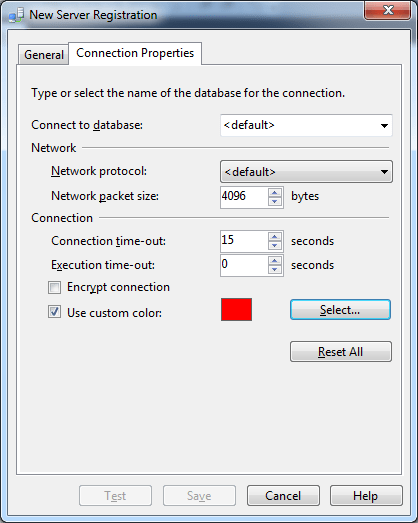
B) In case of, connecting any server directly
1)Click on Connect Server

2) Click on Options à Click on Connection Properties à Check on Use Custom Color and Select your desire color.
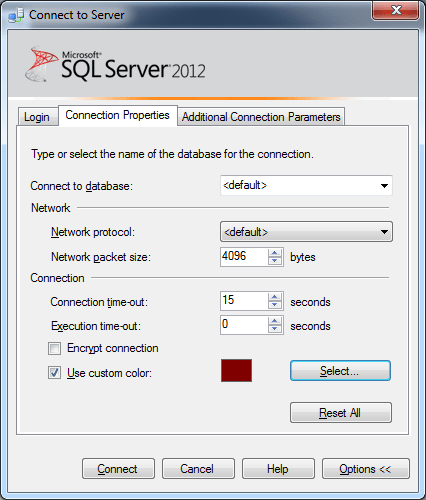
Now, when you will connect your server, its Query window’s Status bar color will be as your selected color, and you can easily identifies your server when you are working on multiple server and frequently changing query windows.
SSMS has a lot of customization features. By default when we copy query result it’s not include columns header. To enable this feature, just set the SSMS setting as
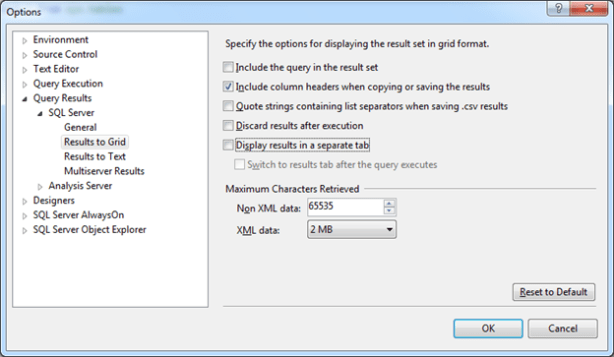
Yesterday my one team guy came to me with an error as
SPID: XX
Process ID: XXXX
Msg 3624, Level 20, State 1, Line 1
A system assertion check has failed. Check the SQL Server error log for details. Typically, an assertion failure is caused by a software bug or data corruption. To check for database corruption, consider running DBCC CHECKDB. If you agreed to send dumps to Microsoft during setup, a mini dump will be sent to Microsoft. An update might be available from Microsoft in the latest Service Pack or in a QFE from Technical Support.
When we checked DBCC CHECKDB, results were as
DBCC CHECKDB WITH NO_INFOMSGS – reported no problems.
DBCC CHECKDB, report 0 errors, 0 consistency errors.
After analyzing queries which he was using, we came to know there was 4-5 joins were used and in two tables a comparing columns was different data types as INT and BIGINT. After changing INT to BIGINT our problem got resolved.
The WordPress.com stats helper monkeys prepared a 2012 annual report for this blog.

Here’s an excerpt:
600 people reached the top of Mt. Everest in 2012. This blog got about 2,100 views in 2012. If every person who reached the top of Mt. Everest viewed this blog, it would have taken 4 years to get that many views.
As per my personal observation/suggestion, Its much better reinstall server again with new name and then detached DBs from OLD instance and Attach with NEW Instance, because a instance name is associated so many things like performance counters, local groups for service start and file ACLs, service names for SQL and related (agent, full text) services, SQL browser visibility, service master key encryption, various full-text settings, registry keys, ‘local’ linked server etc. Although, we can change Name as following the below steps,
— For default instance
sp_dropserver ‘old_name’
go
sp_addserver ‘new_name’,‘local’
go
— For named instance
sp_dropserver ‘Server Name\old_Instance_name’
go
sp_addserver ‘ServerName\New Instance Name’,‘local’
go
Verify sql server instance configuration by running below queries
sp_helpserver
and then restarted the SQL server with following command at command prompt J
net stop MSSQLServerServiceName
net start MSSQLServerServiceName
Here is a script from which we can easily find the Spaceused on MDF and LDF files.
Select DB_NAME() as [DATABASE NAME],
fileid as FILEID,
CASE WHEN groupid = 0 then ‘LOG FILE’ else ‘DATA FILE’ END as FILE_TYPE,
Name as PHYSICAL_NAME,
Filename as PHYSICAL_PATH,
Convert(int,round((sysfiles.size*1.000)/128.000,0)) as FILE_SIZE,
Convert(int,round(fileproperty(sysfiles.name,‘SpaceUsed’)/128.000,0)) as SPACE_USED,
Convert(int,round((sysfiles.size–fileproperty(sysfiles.name,‘SpaceUsed’))/128.000,0)) as SPACE_LEFT
From sysfiles;
 WikiDBA