There are many options to find out SQL Server’s Version, some are as below,

— Option : 1
   SELECT  @@VERSION
— Option : 2
  SELECT  SERVERPROPERTY(‘ProductVersion’ ‘Version’, SERVERPROPERTY(‘ProductLevel’) ‘Service Pack’, SERVERPROPERTY    (‘Edition’‘Edition’
– Option : 3
   sp_server_info
— Option : 4
  xp_msver
— Option : 5
   sp_MSgetversion
— Option : 6
  SELECT  @@MicrosoftVersion /power(2,24)
— Option : 7

        — Finding values from Registry – For SQL Server 2005
xp_regread
@rootkey=‘HKEY_LOCAL_MACHINE’,
@key=‘SOFTWARE\Microsoft\Microsoft SQL Server\MSSQL.1\Setup\’,
@value_name=‘Version’
GO

xp_regread
@rootkey=‘HKEY_LOCAL_MACHINE’,
@key=‘SOFTWARE\Microsoft\Microsoft SQL Server\MSSQL.1\Setup\’,
@value_name=‘Edition’
GO

xp_regread
@rootkey=‘HKEY_LOCAL_MACHINE’,
@key=‘SOFTWARE\Microsoft\Microsoft SQL Server\MSSQL.1\Setup\’,
@value_name=‘SP’
GO

        — Finding values from Registry – For SQL Server 2008)
xp_regread
@rootkey=‘HKEY_LOCAL_MACHINE’,
@key=‘SOFTWARE\Microsoft\Microsoft SQL Server\MSSQL10.MSSQLSERVER\Setup\’,
@value_name=‘Version’
GO

xp_regread
@rootkey=‘HKEY_LOCAL_MACHINE’,
@key=‘SOFTWARE\Microsoft\Microsoft SQL Server\MSSQL10.MSSQLSERVER\Setup\’,
@value_name=‘Edition’
GO
xp_regread
@rootkey=‘HKEY_LOCAL_MACHINE’,
@key=‘SOFTWARE\Microsoft\Microsoft SQL Server\MSSQL10.MSSQLSERVER\Setup\’,
@value_name=‘SP’
GO
—    Step -1 Check Your Configuration Values at Server level
   SP_CONFIGURE  ‘show advanced options’,1
Reconfigure with Override
go
—    Step -2 Check About “min server memory (MB)” & “max server memory (MB)” options Config_value
    SP_CONFIGURE ‘min server memory (MB)’
    SP_CONFIGURE ‘max server memory (MB)’
—    Step -3 Now you can set your prefer amount of Memory as Min & Max as per your’s Server Actual RAM, If its pure DB Box, Its Preferd as SQL:OS is 80:20 ratio ( Its my opinion, not any Standard).

    SP_CONFIGURE ‘min server memory (MB)’,1024
   Reconfigure with Override
go
SP_CONFIGURE ‘max server memory (MB)’,80of Your Total RAM
   Reconfigure with Override
go

The SQL Server Network Interface (SNI) is a protocol layer that establishes the network connection between the client and the server. It consists of a set of APIs that are used by both the database engine and the SQL Server Native Client i.e SNAC

SQL Server has support for the following protocols:


Shared memory: Simple and fast, shared memory is the default protocol used to connect from a client running on the same computer as SQL Server. It can only be used locally, has no configurable properties, and is always tried first when connecting from the local machine means The limitation is that the client applications must reside on the same machine where the SQL Server is installed.


TCP/IP: TCP/IP is the most commonly / the most popular and common protocol widely used throughout the industry today. It communicates across interconnected networks and is a standard for routing network traffics and offers advanced security features.It enables you to connect to SQL Server by specifying an IP address and a port number. Typically, this happens automatically when you specify an instance to connect to. Your internal name resolution system resolves the hostname part of the instance name to an IP address, and either you connect to the default TCP port number 1433 for default instances or the SQL Browser service will find the right port for a named instance using UDP port 1434.


Named Pipes: This protocol can be used when your application and SQL Server resides on a local area network. A part of memory is used by one process to pass information to another process, so that the output of one is the input of the other. The second process can be local (on the same computer as the first) or remote (on a networked computer). TCP/IP and Named Pipes are comparable protocols in the architectures in which they can be used. Named Pipes was developed for local area networks (LANs) but it can be inefficient across slower networks such as wide area networks (WANs). To use Named Pipes you first need to enable it in SQL Server Configuration Manager (if you’ll be connecting remotely) and then create a SQL Server alias, which connects to the server using Named Pipes as the protocol. Named Pipes uses TCP port 445, so ensure that the port is open on any firewalls between the two computers, including the Windows Firewall.


VIA: Virtual Interface Adapter is a protocol that enables high-performance communications between two systems. It requires specialized hardware at both ends and a dedicated connection. Like Named Pipes, to use the VIA protocol you fi rst need to enable it in SQL Server Configuration Manager and then create a SQL Server alias that connects to the server using VIA as the protocol. This protocol has been deprecated and will no longer be available in the future versions of SQL Server.

Regardless of the network protocol used, once the connection is established, SNI creates a secure connection to a TDS endpoint

TDS Endpoint : Tabular Data Stream (TDS) Endpoint also known as TSQL.

For Details About SQL Server ENDPOINT , Very good explained blog is http://www.tobuku.com/docs/SQL%20Server%20Endpoint.pdf , Thanks for writer.

Its very long time waited about paging result sets, MicroSoft finally provide with SQL Server 2012 very unique feature as OFFSET and FETCH.

I got very explanatory blog of Respected Mr. Andy Hayes about it , thanks Andy for same.
http://www.dbadiaries.com/new-t-sql-features-in-sql-server-2012-offset-and-fetch/

So many times we forgot any SQL Statement or text what we had been written in any Stored Procedure, wants to check that Stored procedure name / Statement/Word/Text.

Here are some options, Where we can easily find wanted Text/String within Current Database’s All Stored Procedures.

Option 1:

Select
*
from
Sys.sql_modules
where
definition
like
‘%Your Text Here%’

Option 2:

Select
*
from
Sys.syscomments
where
text
like
‘%Your Text Here%’

Option 3:

Select
*
from
Syscomments
where
text
like
‘%Your Text Here%’

Option 4:

Select
*
from
INFORMATION_SCHEMA.ROUTINES
where
ROUTINE_DEFINITION
like
‘%Your Text Here%’

Select * from TableName in your PRODUCTION code or Stored Procedure is problematic because if a column is added or deleted, you can expect a sure bug.

It is still generally advisable not to use SELECT * because the definition of the table may change over time. For example, a table may have a column added, removed, renamed or repositioned relative to other columns,such changes can result in SQL queries returning data that are never used, attempting to implicitly access data that do not exist, implicitly relying upon a column with a given name or relying upon the relative ordering of the table’s columns. While explicitly indicating only those columns one needs does not prevent problems when a column is removed or renamed, it does prevent problems when a column is added or repositioned and makes it easier to find a problematic query when one is able to search on the text of the column name.

Lets see an example here,

—- Lets create a Test Table.

CREATE
TABLE
[dbo].[VirendraTest](

    [ID]
[int]
IDENTITY(1,1)
NOT
NULL,

    [Name]
[varchar](50)
NOT
NULL,

    [Age]
[int]
NULL

)

GO

—- Lets Insert some data in this Table.

Insert
into
VirendraTest
values

(‘Naresh’,40),

(‘AShok’,42),

(‘Ashish’,27),

(‘Paul’,35),

(‘Smitha’,29)

—- Now Create a View on This Table

Create
View
VWTest

as

(

Select
*
from
VirendraTest

)

go

—- See Data as per View

Select
*
from
VWTest

—- Now, Add a new Column in Table / Position Columns orders / Drop Any Coumn etc..

Alter
table
VirendraTest
add
Gender
varchar(1)
default
‘M’

—- See Data as per View, ha ha ha … its not as per Table.

Select
*
from
VWTest

—- But in Table its as

Select
*
from
VirendraTest

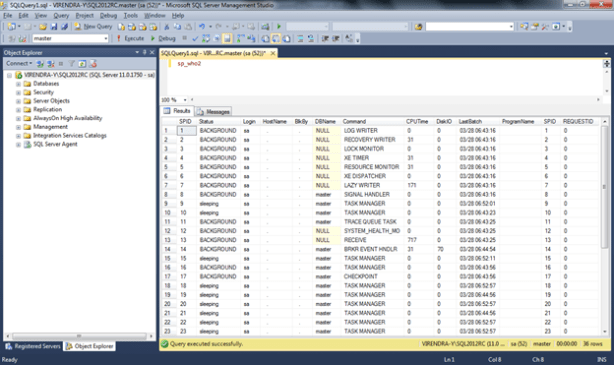
First of all, SP_WHO is a MS-SQL SERVER’s Documented Command while SP_WHO2 is an UnDocumented Command. SP_WHO2 provides more detailed information about Servers running objects as

SPID,Status,Login,HostName,BlkBy,DBName,Command,CPUTime, DiskIO, LastBatch, ProgramName,SPID, REQUESTID


While SP_WHO provides details as

Spid,ecid,status,loginame,hostname,blk,dbname,cmd,request_id

Hi Guys, As a DBA its happend so many times, You started your Database Backup from any remote PC/Server or it may be your Maintenance Plan for Backup Database(s) and you want to know your backup progress status.

Its possible using system SP / DMV, The Query for same will be as

SELECT A.NAME ‘DATABASE NAME’,B.TOTAL_ELAPSED_TIME/60000 AS ‘RUNNING SINCE (Minutes)’,
B.ESTIMATED_COMPLETION_TIME/60000 AS ‘REMAINING TIME(Minutes)’,
B.PERCENT_COMPLETE as ‘BACKUP % COMPLETED’ ,B.COMMAND ‘COMMAND TYPE’,(SELECT TEXT FROM sys.dm_exec_sql_text(B.SQL_HANDLE))AS
‘COMMAND TEXT’,
UPPER(B.STATUS) STATUS,B.SESSION_ID ‘SPID’, B.START_TIME, B.BLOCKING_SESSION_ID, B.LAST_WAIT_TYPE, B.READS, B.LOGICAL_READS, B.WRITES from
MASTER..SYSDATABASES A , sys.dm_exec_requests B
WHERE A.DBID=B.DATABASE_ID AND B.COMMAND LIKE ‘%BACKUP%’
order by percent_complete desc,B.TOTAL_ELAPSED_TIME/60000 desc

Output result will be as below


SQL Error : Exclusive access could not be obtained because the database is in use

One day I got this error, My Logshipping was stopped due to some system fault, after doing so lots of excersice and googling, at last I decided to take full backup and restore it to Secondary box, but by accident , in between R&D, I stopped Logshipping Restoration Job, due to this database was not accessible/Suspect mode and process was in KILLED/ROLLBACK state in SP_WHO2 output.

The reason was very simple, because DB was being used by Killed/Rollback process thus why DB was in use.

There are so many options to kill this rollback operation like killing associated KPID at OS level, or restart the server.(Here i am not afraid of any data loss, because i was going to restore it on this box, My backup was ready.)

Other way is to take this db in Single user mode using Syntax like :

USE
MASTER
ALTER DATABASE yourdatabasename SET SINGLE_USER WITH ROLLBACK

Then again it in Multiuser, and start restore process

USE
MASTER
ALTER DATABASE yourdatabasename SET MULTI_USER WITH ROLLBACK

Other option is like

  1. Find all the active connections, kill them all and restore the database.
  2. Get database to offline because this will close all the opened connections to this database, bring it back to online and restore the database.


Hi Guys, One Day I have to find out all Databases objects like User Table, Procedure & Views.

Below are the code to find out objects information like ObjectName,Type,Create_date Modify_date, Rows,Column_Count,Data_Size,index_size etc.

/* Create Table for Collect Data from All DATABASES */

createtable#VirendraTest(

TableNamevarchar(50),

ObjectTypevarchar(50),

CreateDatedatetime,

ModifyDatedatetime,

RowsCountbigint,

ColumnCounttint,

DataSizevarchar(50),

IndexSizevarchar(50))

/* Process Start to get data from Indivisual Databases */

Declare@sqltxtvarchar(50)

Declare@dbnamevarchar(50)

DECLAREVirendraCurCURSORFORSELECTNamefromSys.databaseswheredatabase_id>4

openvirendraCur

fetchnextfromvirendracurinto@dbname

WHILE@@FETCH_STATUS= 0

begin

set@sqltxt=‘USE ‘+‘[‘+@dbname+‘]’

print@sqltxt

exec (@sqltxt)

CREATETABLE#Virendratemp(

table_namesysname,

row_countINT,

reserved_sizeVARCHAR(50),

data_sizeVARCHAR(50),

index_sizeVARCHAR(50),

unused_sizeVARCHAR(50))

INSERT#Virendratemp

EXECsp_msforeachtable‘sp_spaceused “?”‘

insert#Virendratest

Selectaa.*,bb.col_count,bb.Data_Size,bb.index_sizefrom (

Selectob.Name,ob.type_descType,ob.create_date,ob.modify_date,pt.rowsfromsys.objectsob

leftjoinsys.partitionsptonob.object_id=pt.object_id

whereob.typein(‘U’,‘V’,‘P’))aa

leftjoin(SELECTa.Table_Name,

a.Row_count,

COUNT(*)ASCol_count,

a.Data_size,a.index_size

FROM#Virendratempa

INNERJOINinformation_schema.columnsb

ONa.table_namecollatedatabase_default

=b.table_namecollatedatabase_default

GROUPBYa.table_name,a.row_count,a.data_size,a.index_size)bb

onaa.name=bb.table_name

droptable#Virendratemp

set@sqltxt=‘USE ‘+‘[‘+@dbname+‘]’

exec (@sqltxt)

fetchnextfromvirendracurinto@dbname

end

closevirendracur

deallocatevirendracur

/* Display Collected Data */

Select*from#VirendraTest

/* Drop Temp Table */

DropTable#VirendraTest