
SQL SERVER – Check If Column Exists in SQL Server Table
Posted: July 1, 2013 by Virendra Yaduvanshi in Database AdministratorTags: Check column, checking column where it exist or not, column exist
Difference between HIGH AVAILABILITY and DISASTER RECOVERY
Posted: June 28, 2013 by Virendra Yaduvanshi in Database AdministratorTags: data replication, DIFFERENCE BETWEEN HIGH AVAILABILITY and DISASTER RECOVERY, DR, HA, HA vs DR, high availability, Misconception about High Availability and Disaster Recovery, The Shortcut Guide To Untangling the Differences Between High Availability and Disaster Recovery
Its many time seen, so many people often confused or thought High Availability and Disaster Recovery (DR) are the same thing. A high-availability solution does not mean that you are prepared for a disaster. High availability covers hardware or system-related failures, whereas disaster recovery can be used in the event of a catastrophic failure due to environmental factors. Although some of the high-availability options may help us when designing our DR strategy, they are not the be-all and end-all solution.
The goal of high availability is to provide an uninterrupted user experience with zero data loss. According to Microsoft’s SQL Server Books Online, “A high-availability solution masks the effects of a hardware or software failure and maintains the availability of applications so that the perceived downtime for users is minimized”.
Disaster recovery is generally a part of a larger process known as Business Continuity Planning (BCP), which plans for any IT or non IT eventuality. A server disaster recovery plan helps in undertaking proper preventive, detective and corrective measures to mitigate any server related disaster. Here is the very good book “The Shortcut Guide To Untangling the Differences Between High Availability and Disaster Recovery” by Richard Siddaway for more details. As per my understanding below explanation is the best and quickest way to remember this is:
High Availability is @ LAN and Disaster Recovery is @ WAN
J
Temporary Stored Procedures
Posted: June 28, 2013 by Virendra Yaduvanshi in Database AdministratorTags: # procedure, SQL Server Temporary procedure, SQL Server temporary staored procedure, SQL SERVER Temporary Stored Procedures, Stored procedure in tempdb, Temporary stored procedures
Temporary stored procedures are like normal stored procedures but, as their name suggests, have short-term existence. There are two types of temporary stored procedures as Private and global are analogous to temporary tables, can be created with the # and ## prefixes added to the procedure name. The symbol # denotes a local temporary stored procedure while ## denotes a global temporary stored procedure. These procedures do not exist after SQL Server is shut down.
Temporary stored procedures are useful when connecting to earlier versions of SQL Server that do not support the reuse of execution plans for Transact-SQL statements or batches. Any connection can execute a global temporary stored procedure. A global temporary stored procedure exists until the connection used by the user who created the procedure is closed and any currently executing versions of the procedure by any other connections are completed. Once the connection that was used to create the procedure is closed, no further execution of the global temporary stored procedure is allowed. Only those connections that have already started executing the stored procedure are allowed to complete. If a stored procedure not prefixed with # or ## is created directly in the tempdb database, the stored procedure is automatically deleted when SQL Server is shut down because tempdb is re-created every time SQL Server is started. Procedures created directly in tempdb exist even after the creating connection is terminated.
Converting Milliseconds/Nanoseconds date string values to Date/Datetime
Posted: June 27, 2013 by Virendra Yaduvanshi in Database AdministratorTags: "Msg 241, Conversion failed when converting date and/or time from character string, Converting Date string values's miliseconds to Date/Datetime, Converting Milliseconds date string values to Date/Datetime, Level 16, Line 1, Msg 241 Level 16 State 1 Line 1, State 1
Data type conversion is very frequent and common practices with data to manipulate or reproduce data. As we regularly use conversion functions CONVERT and CAST in our daily routine.
Sometime its very needed to convert any datetime value to string or Date string to Datetime.
Let see example below for Datetime to character string conversion
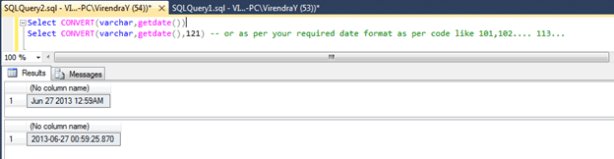
Suppose if it required to convert a date string to date/Datetime, usually we use
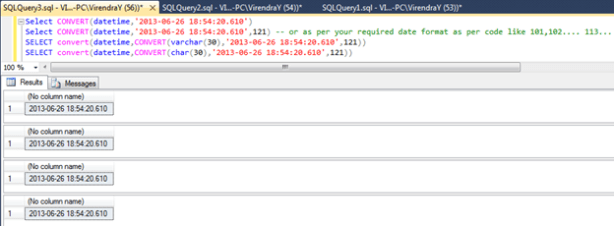
But now if milliseconds part is more than 3 digits, it will give error message as
Msg 241, Level 16, State 1, Line 1
Conversion failed when converting date and/or time from character string.

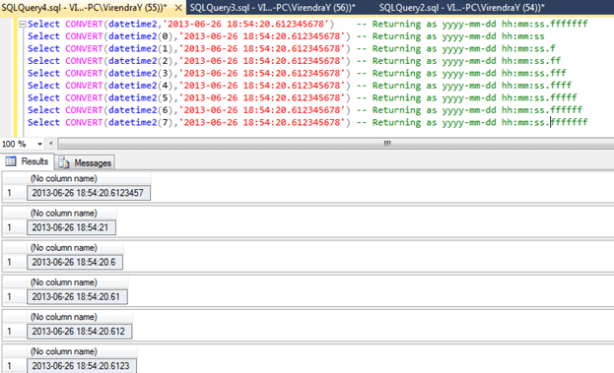
To resolve this, new data type DATETIME2 introduced from SQL Server 2008 onwards and beauty of DATETIME2 is that its supports fractional precision upto 7 digit. Let See examples
SQL Server 2014 – In-Memory OLTP(Code :Hekaton) support
Posted: June 26, 2013 by Virendra Yaduvanshi in Database AdministratorTags: aspirational goal, brent ozar, Column Store, ColumnStore, data warehousing and business intelligence, Hekaton, In-memory OLTP, software, SQL Codename - Hekaton, SQL Server 2014, SQL Server 2014 Features, SSD, technology, Whats new in SQL Server 2014, XVelocity column
SQL Server 2014 CTP1 released on 26-Jun-2013, highly focused on data warehousing and business intelligence (BI) enhancements made possible through new in-memory capabilities built in to the core Relational Database Management System (RDBMS). As memory prices have fallen dramatically, 64-bit architectures have become more common and usage of multicore servers has increased, Microsoft has sought to tailor SQL Server to take advantage of these trends.
Hekaton is a Greek term for “factor of 100.” The aspirational goal of the team was to see 100 times performance acceleration levels. Hekaton also is a giant mythical creature, as well as a Dominican thrash-metal band, for what it’s worth.
In-Memory OLTP (formally known as code name “Hekaton”) is a new database engine component, fully integrated into SQL Server. It is optimized for OLTP workloads accessing memory resident data. In-Memory OLTP allows OLTP workloads to achieve remarkable improvements in performance and reduction in processing time. Tables can be declared as ‘memory optimized’ to take advantage of In-Memory OLTP’s capabilities. In-Memory OLTP tables are fully transactional and can be accessed using Transact-SQL. Transact-SQL stored procedures can be compiled into machine code for further performance improvements if all the tables referenced are In-Memory OLTP tables. The engine is designed for high concurrency and blocking is minimal. “Memory-optimized tables are stored completely differently than disk-based tables and these new data structures allow the data to be accessed and processed much more efficiently”
New buffer pool extension support to non-volatile memory such as solid state drives (SSDs) will increase performance by extending SQL Server in-memory buffer pool to SSDs for faster paging.
Here is very good explanation from Mr. Brent Ozar’s article on this ( http://www.brentozar.com/archive/2013/06/almost-everything-you-need-to-know-about-the-next-version-of-sql-server/ )
The New Feature xVelocity ColumnStore provides in-memory capabilities for data warehousing workloads that result in dramatic improvement for query performance, load speed, and scan rate, while significantly reducing resource utilization (i.e., I/O, disk and memory footprint). The new ColumnStore complements the existing xVelocity ColumnStore Index, providing higher compression, richer query support and updateability of the ColumnStore giving us the even faster load speed, query performance, concurrency and even lower price per terabyte.
Extending Memory to SSDs: Seamlessly and transparently integrates solid-state storage into SQL Server by using SSDs as an extension to the database buffer pool, allowing more in-memory processing and reducing disk IO.
Enhanced High Availability : New AlwaysOn features availability Groups now support up to 8 secondary replicas that remain available for reads at all times, even in the presence of network failures. Failover Cluster Instances now support Windows Cluster Shared Volumes, improving the utilization of shared storage and increasing failover resiliency. Finally, various supportability enhancements make AlwaysOn easier to use.
Improved Online Database Operations: includes single partition online index rebuild and managing lock priority for table partition switch, greatly increasing enterprise application availability by reducing maintenance downtime impact.
For more details please refer SQL_Server_Hekaton_CTP1_White_Paper and for SQL Server 2014 CTP1 software click on http://technet.microsoft.com/en-US/evalcenter/dn205290.aspx (The Microsoft SQL Server 2014 CTP1 release is only available in the X64 architecture.)
I appreciate your time, keep posting your comment. I will be very happy to review and reply to your comments/Questions/Doubts as soon as I can.
Checkpoint
Posted: June 24, 2013 by Virendra Yaduvanshi in Database AdministratorTags: Checkpoint, Database Checkpoint, dirty pages, dirty read/write, SQL Server Checkpoint, when checkpoint happend, when checkpoint occure, why checkpoint in sql server
CHECKPOINT : As per MSDN/BOL , A checkpoint writes the current in-memory modified pages (known as dirty pages) and transaction log information from memory to disk and, also, records information about the transaction log because For performance reasons, the Database Engine performs modifications to database pages in memory—in the buffer cache—and does not write these pages to disk after every changes made. Checkpoint is the SQL engine system process that writes all dirty pages to disk for the current database. The benefit of the Checkpoint process is to minimize time during a later recovery by creating a point where all dirty pages have been written to disk.
When CHECKPOINT happen?
- A CHECKPOINT statement is explicitly executed. A checkpoint occurs in the current database for the connection.
- A minimally logged operation is performed in the database; for example, a bulk-copy operation is performed on a database that is using the Bulk-Logged recovery model.
- Database files have been added or removed by using ALTER DATABASE.
- An instance of SQL Server periodically generates automatic checkpoints in each database to reduce the time that the instance would take to recover the database.
- A database backup is taken. Before a backup, the database engine performs a checkpoint, in order that all the changes to database pages (dirty pages) are contained in the backup.
-
Stopping the server using any of the following methods, they it cause a checkpoint.
-
Using Shutdown statement,
-
Stopping SQL Server service through SQL Server configuration, SSMS, net stop mssqlserver and ControlPanel-> Services -> SQL Server Service.
-
When the “SHUTDOWN WITH NOWAIT” is used, it does not execute checkpoint on the database.
-
-
When the recovery internal server configuration is accomplished. This is when the active portion of logs exceeds the size that the server could recover in amount of time defined on the server configuration (recovery internal).
-
When the transaction log is 70% full and the database is in truncation mode.
-
The database is in truncation mode, when is in simple recovery model and after a backup statement has been executed.
-
An activity requiring a database shutdown is performed. For example, AUTO_CLOSE is ON and the last user connection to the database is closed, or a database option change is made that requires a restart of the database.
-
Long-running uncommitted transactions increase recovery time for all types of checkpoints.
The time required to perform a checkpoint depends directly of the amount of dirty pages that the checkpoint must write.
We can monitor checkpoint I/O activity using Performance Monitor by looking at the “Checkpoint pages/sec” counter in the SQL Server:Buffer Manager object.
Tracking data/log file size increment for a database
Posted: June 24, 2013 by Virendra Yaduvanshi in Database AdministratorTags: backupfile, backupset, Data file growth hi History, DataBase Growth History, DB Growth History, Log file growth history, SQL Server Database Size growth, SQL Server Database Size increment, Tracking data/log file size increment for a database
Here is a script to find out database’s file (either Data file-MDF or Log File – LDF ) growth details. To find this we can use MSDB’s two tables, one is backupfile table which Contains one row for each data or log file of a database and secondone is backupset table which Contains a row for each backup set.
Script is as below.
SELECT BS.database_name
,BF.logical_name
,file_type
,BF.file_size/(1024*1024) FileSize_MB
,BS.backup_finish_date
,BF.physical_name
FROM msdb.dbo.backupfile BF
INNER JOIN msdb.dbo.backupset BS ON BS.backup_set_id = BF.backup_set_id
AND BS.database_name = ‘VirendraTest’ — Database Name
WHERE logical_name = VirendraTest’ — DB’s Logical Name
ORDER BY BS.backup_finish_date DESC
Increasing Database Mail attachment size
Posted: June 24, 2013 by Virendra Yaduvanshi in Database AdministratorTags: Attachement size, Increase database email attachment Size in SQL Server, Increasing Attachement Size, Increasing Attachement Size capacity in SQL SERVER, SP_Sendmail, The Attachment Size exceeds the allowable limit
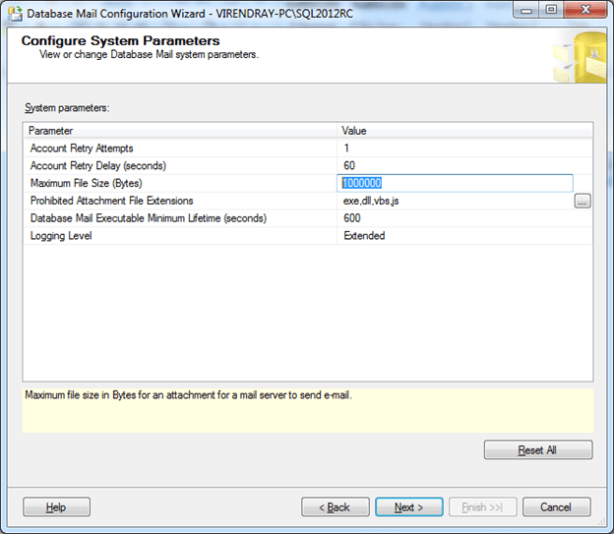
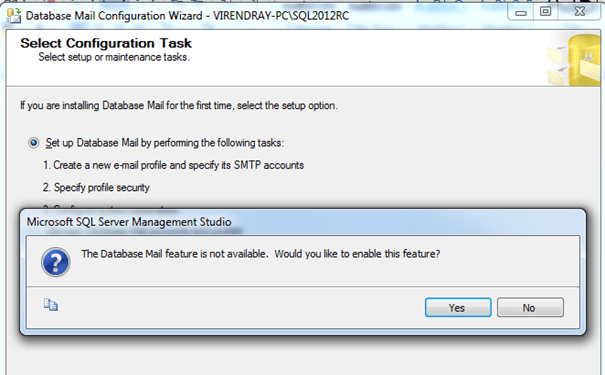
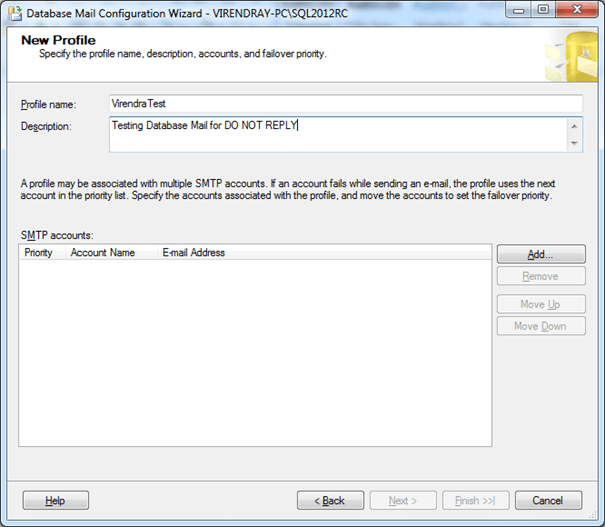
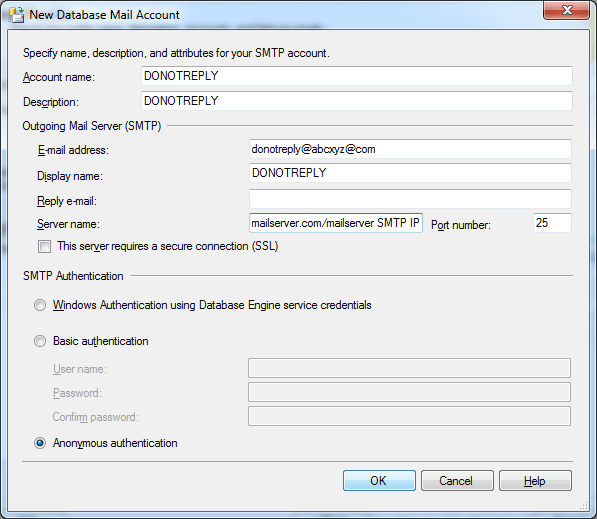
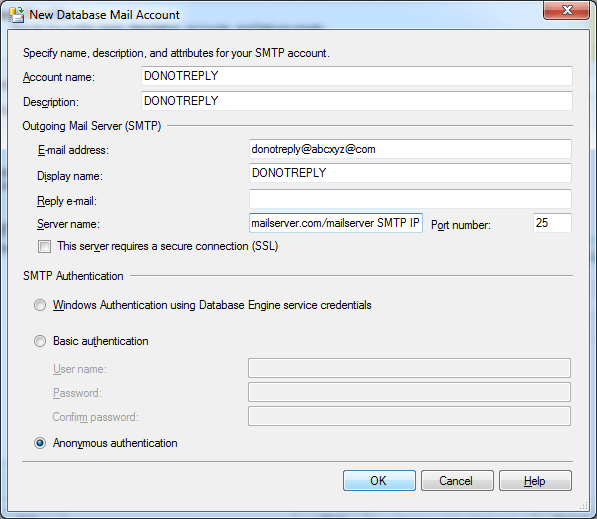
Hi, as we frequently use Database mail for SQL Server’s email sending, commonly we use to send an email for JOB status, Maintenance task info, operator alerts… etc. sometime we send reports like Database disk usages, Server Dashboard, Memory Consumptions .. etc as a PDF or Excel attachments. By default, attachment size is 1000000 bytes. If attachments size is more than this, an error ‘The Attachment Size exceeds the allowable limit’ will occurred. Below is the step by step solution for this using SSMS.
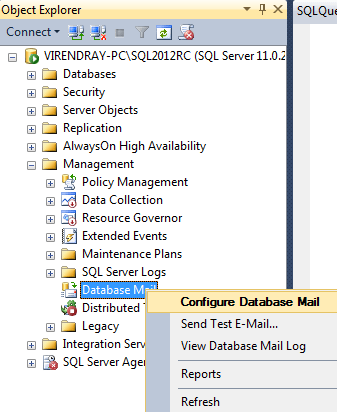
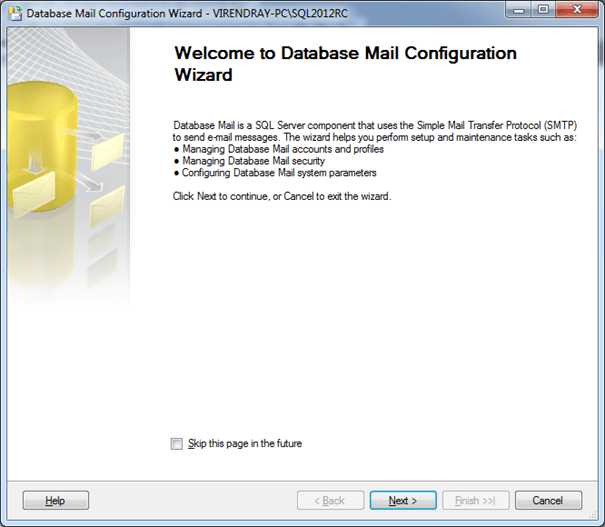
- Open the SSMS and connect to SQL server Instance, then go to Management -> Right Click on Database mail -> choose Configure Database Mail
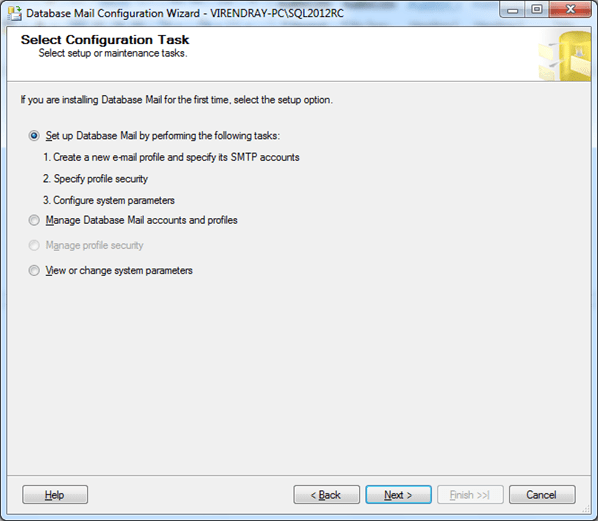
2) Select View or change system parameters radio button from the popup menu then next
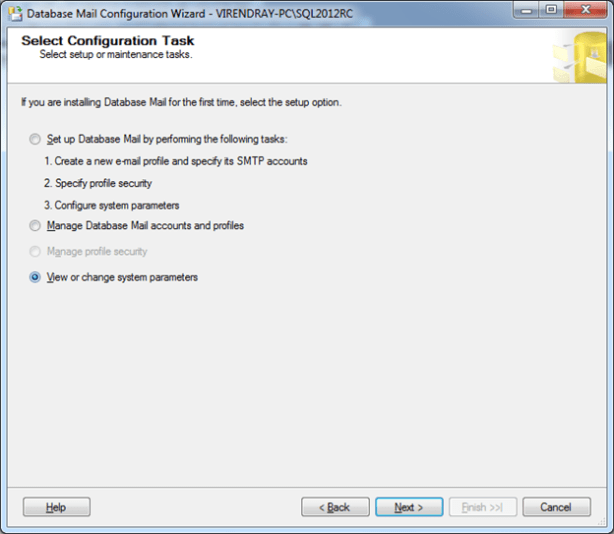
3) Change the Maximum File Size (Bytes) values from 1000000 to as per your requirement, then next and finish.


SQL Server Management Studio Tip: Get a Customized New Query Window
Posted: June 10, 2013 by Virendra Yaduvanshi in Database AdministratorTags: Customized new query windows, Customizing SSMS, Modified new query windows, SQL Server's SSMS new query windows, SSMS new query windows, SSMS tips
Here is a SSMS tips where we can customized our new query windows as,
For SQL Server 2008 (64 Bits)
1) Find the file SQLFile.SQL , which mostly located at C:\Program Files (x86)\Microsoft SQL Server\100\Tools\Binn\VSShell\Common7\IDE\SqlWorkbenchProjectItems\Sql\SQLFILE.SQL
and modify the file as per your wish.
For SQL Server 2008 (32 Bits)
1) Find the file SQLFile.SQL , which mostly located at C:\Program Files\Microsoft SQL Server\100\Tools\Binn\VSShell\Common7\IDE\SqlWorkbenchProjectItems\Sql\SQLFILE.SQL
and modify the file as per your wish.
For SQL Server 2012 (64 Bits)
1) Find the file SQLFile.SQL , which mostly located at C:\Program Files\Microsoft SQL Server\110\Tools\Binn\ManagementStudio\SqlWorkbenchProjectItems\Sql\SQLFile.sql
and modify the file as per your wish.
For SQL Server 2012 (32 Bits)
1) Find the file SQLFile.SQL , which mostly located at C:\Program Files\Microsoft SQL Server\110\Tools\Binn\ManagementStudio\SqlWorkbenchProjectItems\Sql\SQLFile.sql
and modify the file as per your wish.
Let See my Modified SQLFILE.SQL file as

Source : Mr. Amit Bansal’s Blog
 WikiDBA