• Home
  • About Me
  • Contact Us
  • Gallery
  • Resume

WikiDBA

by Virendra Yaduvanshi – Microsoft SQL Server Database Architect | Consultant | Blogger | Specialist | DBA | Speaker
Stay updated via RSS

  • SQL Authors

    • Virendra Yaduvanshi's avatar
  • Articles

  • Blog Stats

    wordpress visitor counter View My Stats
  • Search

  • Social

    • View YaduvanshiVirendra’s profile on Facebook
    • View v_yaduvanshi’s profile on Twitter
    • View virendrayaduvanshi’s profile on LinkedIn
  • wikidba

    wikidba

Connecting SQL Server from different domain

Posted: July 16, 2013 by Virendra Yaduvanshi in Database Administrator
Tags: Additional Connection Parameters in the Connect to Database login window, Additional Connection Parameters tab, Connecting SQL Server from different domain, How to coonect SQL Server from different domain, SQL Server Login, SQL Server Login Tab
1

Let see Additional Connection Parameters in the Connect to Database login window how used to connect SQL Server from different domain
It’s a very typical use case for us, when we need to connect to a SQL server in a different domain, such as production or TEST/UAT or cloud domain, its generally requires Windows-only authentication (its more secured) that is different from our current security login context, but the “User name” is grayed out and can’t be changed when we select “Windows Authentication” in the “Login” tab.

As per below image, User name is not editable in case of Windows Authentication.

I would like to use User Name as DCDOMAIN\Virendra.Yaduvanshi, to do this just click on Option button, then Select Additional Connection Parameters tab, and write there your additional connection string as below image,
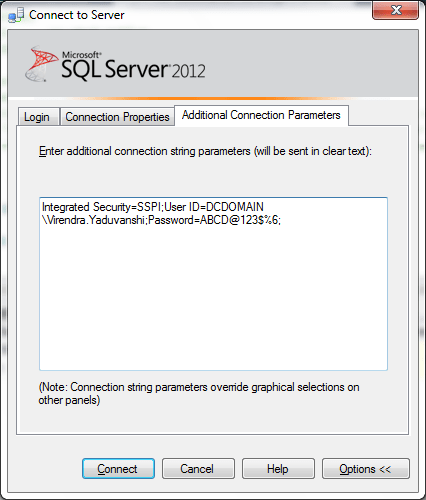
Now click on connect, JJ
Great!, now you are connected.

Note : Please refer http://www.connectionstrings.com for connection string.

Share this:

  • Click to share on Facebook (Opens in new window) Facebook
  • Click to share on LinkedIn (Opens in new window) LinkedIn
  • Click to share on X (Opens in new window) X
  • Click to share on Tumblr (Opens in new window) Tumblr
  • Click to print (Opens in new window) Print
  • Click to email a link to a friend (Opens in new window) Email
Like Loading...

Related

Comments
  1. minecraft cuenta premium generador| minecraft cuentas activas|minecraft cuentas premium activas 2014| minecraft cuenta premium gratis| minecraft cuenta premium gratis 2014| minecraft cuenta premium gratis| minecraft cuenta premium gratis generador|'s avatar minecraft cuenta premium generador| minecraft cuentas activas|minecraft cuentas premium activas 2014| minecraft cuenta premium gratis| minecraft cuenta premium gratis 2014| minecraft cuenta premium gratis| minecraft cuenta premium gratis generador| says:
    September 6, 2014 at 8:27 pm

    Hmm is anyone else experiencing problems with the pictures on this blog loading?
    I’m trying to find out if its a problem on my end or if it’s the
    blog. Any feed-back would be greatly appreciated.

    LikeLike

    Reply

Leave a comment Cancel reply

Contained Databases
Negative SPID

  • Upcoming Events

  • Follow WikiDBA on WordPress.com
  • Virendra Yaduvanshi

    Sector - 46, Gurgaon
    +91 8130396263
    Lunch: 11am - 2pm
    Dinner: M-Th 5pm - 11pm, Fri-Sat:5pm - 1am
Blog at WordPress.com.
Privacy & Cookies: This site uses cookies. By continuing to use this website, you agree to their use.
To find out more, including how to control cookies, see here: Cookie Policy
  • Comment
  • Reblog
  • Subscribe Subscribed
    • WikiDBA
    • Join 698 other subscribers
    • Already have a WordPress.com account? Log in now.
    • WikiDBA
    • Subscribe Subscribed
    • Sign up
    • Log in
    • Copy shortlink
    • Report this content
    • View post in Reader
    • Manage subscriptions
    • Collapse this bar
%d