
As a DBA, its very frequent task with databases from the production environment to a lower or higher level environment such as QC,UAT or DEV or Server migration task. One very typical problem facing is to getting the correct logins and properly aligned with users within the database. Even in database backup/restore process, with restore it may be left with orphaned users that do not have a corresponding server login, or misaligned internal SID’s that need to fix using the sp_change_users_login system stored procedure. I means this process takes multiple rounds to get everything in synced order and we can face users reports that particular login is not working…,
To resolve this problem, In SQL SERVER 2012, new feature Contained Database introduced. This enables a user in a database to exist without a corresponding login on the server. For security this makes the database more portable in the event where task like migrating servers, or restoring lower level environments.
To enable Contained Database feature, we have to change some Instance level setting with T-SQL or SSMS. Let see TSQL example
sp_configure ‘show advanced options’,1
GO
RECONFIGURE WITH OVERRIDE
GO
sp_configure ‘contained database authentication’,1
GO
RECONFIGURE WITH OVERRIDE
GO
From SSMS, right click on the instance name and select the “Properties” option. Once the Server Properties interface loads, choose the “Advanced” option in the left navigation then set the “Enable Contained Databases” to “true”.
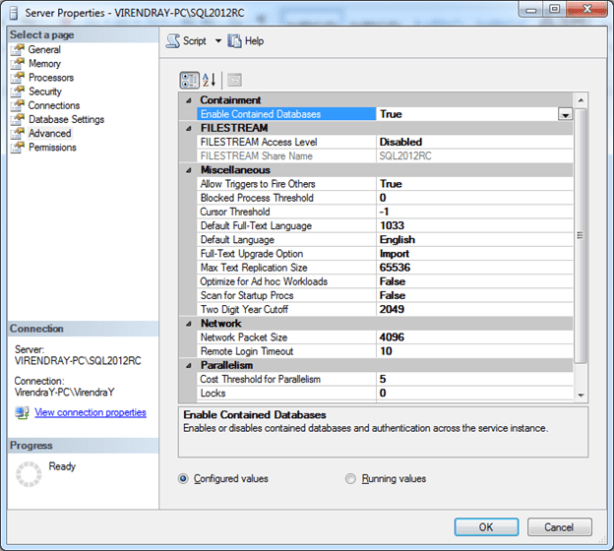
To create new Contained Database, T-SQL syntax is
CREATE DATABASE VirendraTest
CONTAINMENT = PARTIAL
ON PRIMARY ( NAME = N’VirendraTest’, FILENAME = N’D:\TESTDB\VirendraTest.mdf’ , SIZE = 3072KB , FILEGROWTH = 1024KB )
LOG ON ( NAME = N’VirendraTest_log’, FILENAME = N’C:\TESTDB\VirendraTest_log.ldf’ , SIZE = 1024KB , FILEGROWTH = 10%)
GO
And from SSMS, right click the “Databases” folder and select the “New Database” option. This will load the New Database interface. On this interface go to the “Options” tab and for the “Containment” dropdown select the “Partial” option.

To change existing database as Contained database, T-SQL syntax is
USE [Master]
GO
ALTER DATABASE VirendraTest SET CONTAINMENT = PARTIAL WITH NO_WAIT
GO
From SSMS, right click on the database and select the “Properties” option which will load the Database Properties interface. In this interface select the “Options” menu and for the “Containment Type” option select “Partial” from the drop down list.
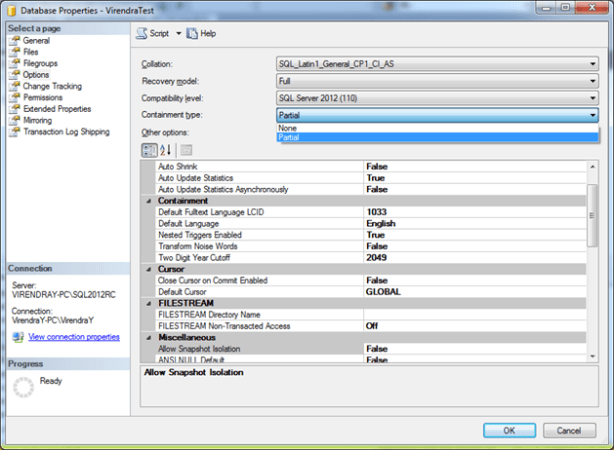
Partially Contained Databases are beneficial in case of
1) Database Movement
2) Initial Database Development
3) Contained Database Users with AlwaysOn
4) Database Administration
Maintaining database settings in the database, instead of in the master database, lets each database owner have more control over their database, without giving the database owner sysadmin permission.
Limitation of Contained Database are its don’t support replication, change data capture, or change tracking, numbered procedures, schema-bound objects that depend on built-in functions with collation changes and binding changes resulting from collation changes.
 WikiDBA
Hi sir can I Installed sql server 2008 in linex On Jul 1, 2013 6:39 PM, “Virendra Yaduvanshi” wrote:
> ** > Virendra Yaduvanshi posted: “As a DBA, its very frequent task with > databases from the production environment to a lower or higher level > environment such as QC,UAT or DEV or Server migration task. One very > typical problem facing is to getting the correct logins and properly > aligned w”
LikeLike
Hi Amol,
Sorry for late reply as i was busy on others projects,
You can’t install MS SQL server on Linux, but you can connect it via java ODBC connector in linux environment.
LikeLike